
QuickBooks Live Expert Cleanup: A Practical Guide

If your QuickBooks file is a mess right now, you probably already know the problem isn't software. It's the backlog, the missing receipts, the uncleared bank items, and the tax deadline breathing down your neck while you try to remember what got booked where. QuickBooks Live Expert Cleanup is Intuit's answer for that kind of catch-up work, but it's a narrow service with hard lines around scope, timing, and eligibility.
That's the part owners need to understand before they buy it. If your books fit the box, the service can get you back to a usable ledger. If they don't, you'll waste time inside a process that won't own the ugly parts of the cleanup for you.
Table of Contents
Who Qualifies and How Long It Takes - Check the gates before you book anything
How the Pricing Works in Practice - QuickBooks Live Cleanup Cost Drivers
What an Expert Cleanup Should Include - Reconcile first, explain second
Where QuickBooks Live Falls Short - The hard stops show up fast
Choosing the Right Cleanup Provider - Ask for the acceptance packet
What QuickBooks Live Expert Cleanup Is
A contractor opens QuickBooks after months of chasing jobs and paying suppliers. The bank feed is crowded with duplicates, expenses sit in the wrong categories, and the balance sheet no longer matches the business. The owner needs a defined repair project, with clear limits on what the service will take on.
That is the use case for QuickBooks Live Expert Cleanup. It is a one-time remediation service inside QuickBooks Online that organizes and corrects historical records, including transaction categorization and account reconciliation, as described by Intuit support. The work covers the prior or current fiscal year, requires onboarding within 60 days of purchase, and does not include refiling a tax return for a period that has already been filed.
The service is project work rather than ongoing bookkeeping. You provide access and requested records, the cleanup gets completed, and the file should be usable for reporting and follow-on bookkeeping.
Practical rule: treat QuickBooks Live Cleanup as a scoped repair job. Confirm the dates, records, and corrections you need before you buy.
QuickBooks Live works well when the backlog is contained, the supporting documents exist, and the file needs organized cleanup within QuickBooks Online. It does not replace tax filing, CFO work, or a full rebuild of every historical period.
The harder question is ownership. If the books require a diagnostic, extensive reclassification, missing support, or final sign-off across several periods, hire a third-party bookkeeping firm that will own the corrections from diagnosis through delivery. A broader cleanup bookkeeping guide can help you compare that type of engagement with a defined QuickBooks Live project.
Who Qualifies and How Long It Takes
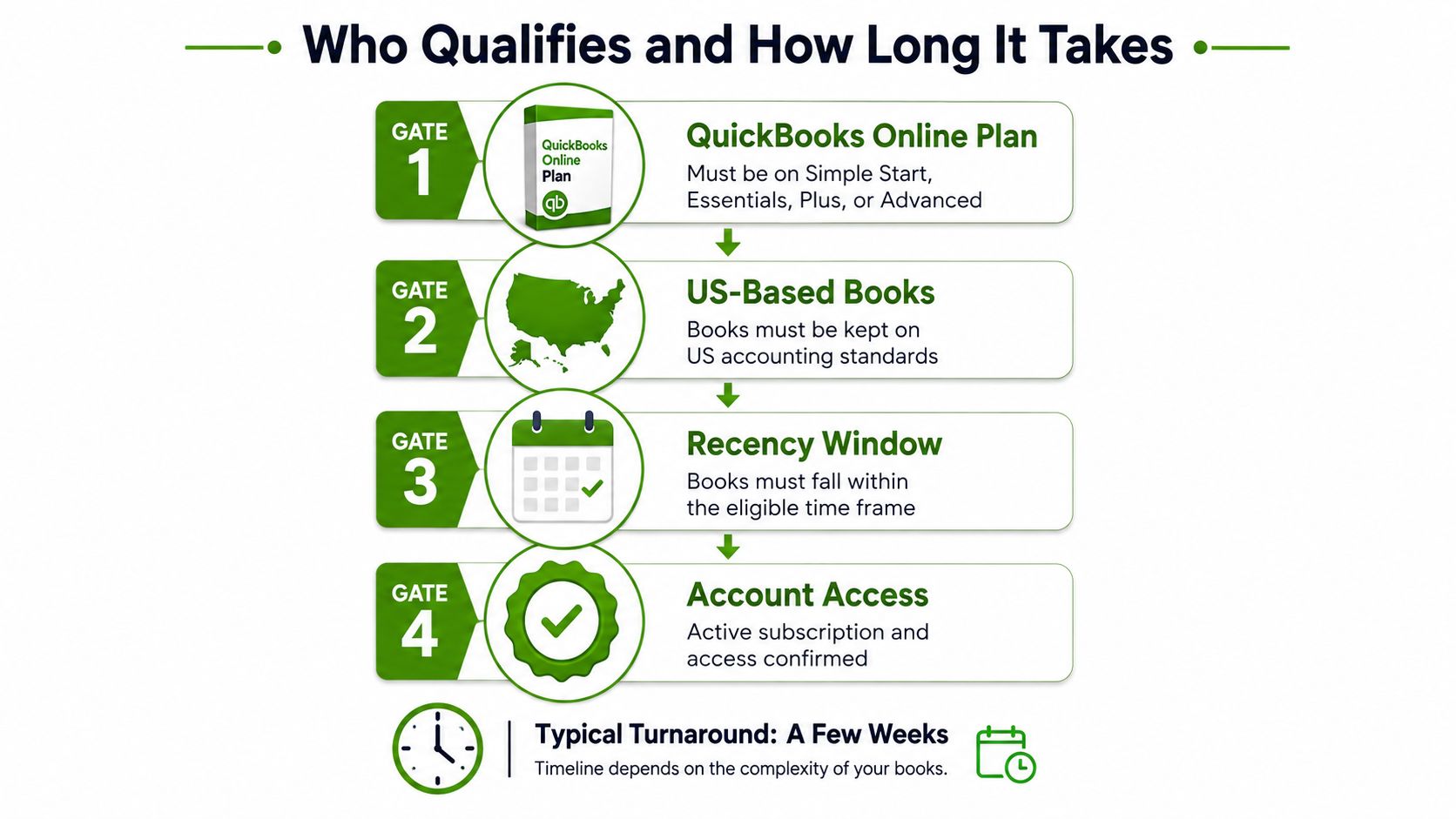
A business owner with one messy QuickBooks Online file, accessible records, and a recent backlog may fit QuickBooks Live Expert Cleanup. An unsupported QuickBooks Online plan ends the conversation before timing or pricing matters. Intuit's eligibility terms also limit the project to the current or prior fiscal year, require onboarding within 60 days of purchase, and depend on the customer providing requested information (Intuit support).
Check the gates before you book anything
Plan check: Confirm that your QuickBooks Online subscription supports the service.
Fiscal-year check: Confirm that the records fall within the prior or current fiscal year.
Tax-return check: If the return for that period has already been filed, understand that those records are excluded from the cleanup scope.
Access check: Be ready for the onboarding call, document uploads, and an active subscription while the project is in progress.
The timeline has a firm dependency: QuickBooks Live generally takes about 30 days after you provide all required information. Missing statements, receipts, or answers can extend the work because the bookkeeper cannot correct entries without adequate support.
If you can produce bank statements and receipts within a week, the 30-day window is realistic. If document collection takes a month, expect the project to stretch accordingly.
Use those boundaries to judge the fit. QuickBooks Live can work well when the backlog is contained and the records are available for one recent fiscal year. Hire a third-party bookkeeping firm when the books span several periods, require a full diagnostic, contain extensive reclassification, or need corrections that go beyond the defined project. That firm should own the work from diagnosis through final delivery instead of making you interpret every exception.
How the Pricing Works in Practice
The published starting price is only the first input. Intuit's cleanup page states that QuickBooks Live Expert Cleanup starts at $150 per month-equivalent period and varies with the number of months requiring work (Intuit pricing). The practical cost depends on how much historical activity the bookkeeper must review, correct, and bring current.
Cleanup pricing follows separate billing logic from recurring bookkeeping. Customers with at least two months of existing QuickBooks data may receive a flat cleanup and setup fee for the first month. After that, recurring QuickBooks Live Bookkeeping pricing is based on average company expenses and reevaluated every three months. Cleanup is a defined remediation project. Recurring bookkeeping is priced and reviewed as an ongoing service.
QuickBooks Live Cleanup Cost Drivers
Cost Driver | Lower Price | Higher Price |
|---|---|---|
Months requiring cleanup | Fewer months | More months |
Existing QuickBooks history | Minimal catch-up | Extended catch-up |
Recurring bookkeeping need | No ongoing plan | Ongoing pricing can change with expenses |
Ask for the number of months included before you judge the quote. A shallow backlog creates a contained project. Several unreconciled months require more review and usually increase the total because the engagement covers a longer period.
The starting price is a reference point, not a universal quote. It also does not answer whether a defined QuickBooks Live project fits the condition of your file. If the books need broader diagnosis, extensive reclassification, or recovery across multiple periods, compare the quote with a third-party firm that will own the investigation and corrections from start to finish.
Use this cleanup bookkeeping cost guide before speaking with sales. It gives you a practical comparison point for deciding whether to purchase a limited cleanup or hire a firm for a larger recovery.
What an Expert Cleanup Should Include
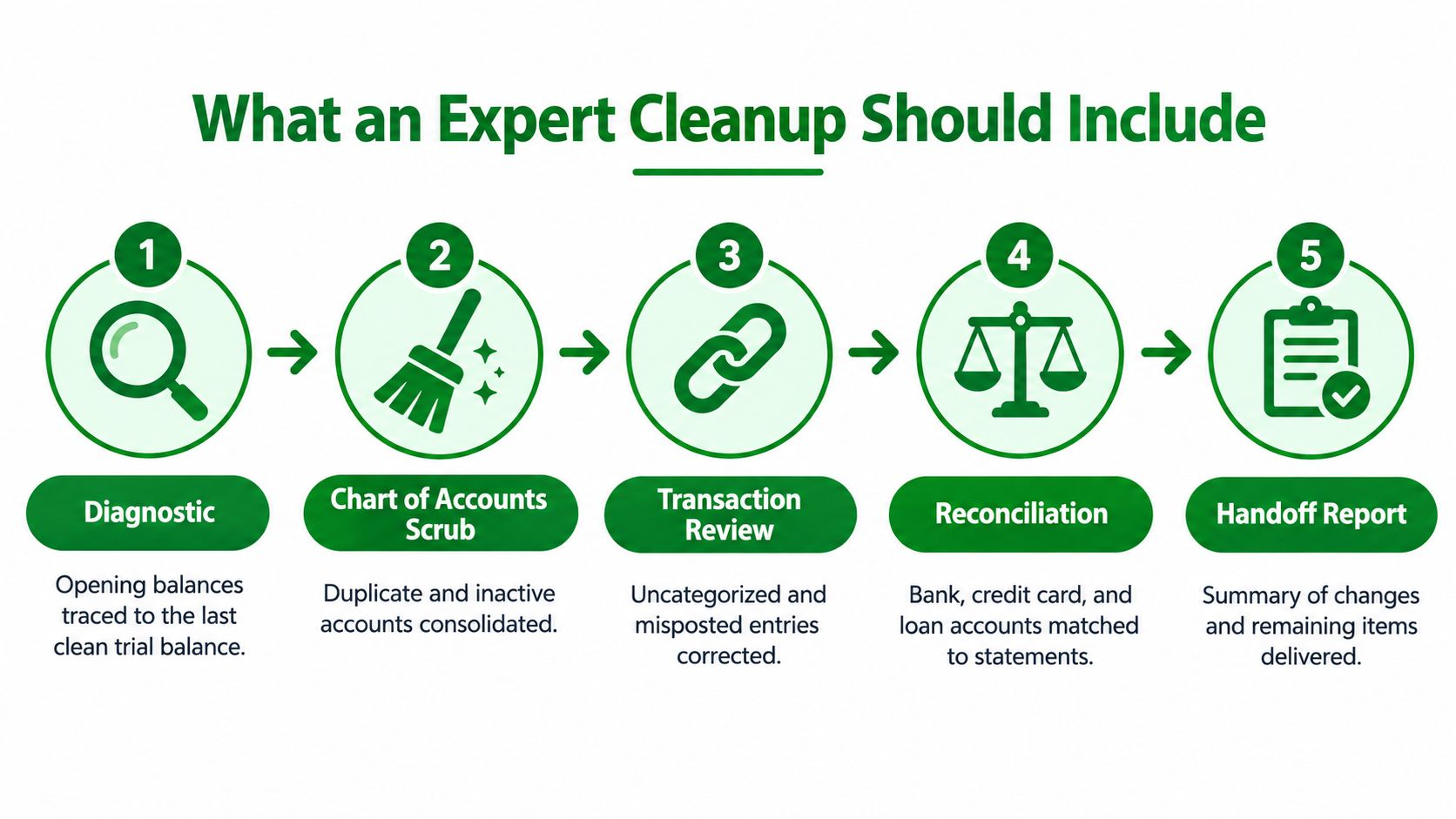
A proper cleanup begins with a defined scope and a diagnostic. QuickBooks Live generally works within a 60-day onboarding window and addresses the prior or current fiscal year. It does not re-file tax returns. Those boundaries may fit a contained backlog, but they matter if your books have older errors or tax issues.
The first accounting step is to trace opening balances to the last clean trial balance. Then review the chart of accounts for duplicates and stale accounts, identify uncategorized and split transactions, and prepare specific questions for the owner. A provider should map the problem before posting corrections.
Reconcile first, explain second
Use the audit log to establish what changed, who changed it, and when. QuickBooks Online records sign-ins, configuration changes, edits to customers, vendors, employees, and payroll submissions. It can be filtered by user, date, or event, as shown in the Intuit audit log. That record helps connect a balance-sheet change to an actual action instead of guessing and forcing in a journal entry.
A cleanup that ignores the audit trail can make the file look orderly while leaving the original error unexplained.
The work should reconcile bank accounts, credit cards, loans, and other balance-sheet accounts to external statements. It should correct entries posted in the wrong period while preserving a clear record of what changed and why. Duplicate transactions also need careful review. This reference on avoiding duplicate transactions in QuickBooks can help owners understand the risk when a bank feed has already been imported more than once.
Your preparation affects the outcome. Provide bank access, prior accountant workpapers, ownership details, payroll setup information, and sales-tax registration answers. This QuickBooks Online cleanup article provides a practical review of the mechanics before you compare providers.
The handoff should include a corrected trial balance, reconciliation reports, and a written summary of adjustments. Ask which periods were reviewed and which issues remain outside scope. If the provider cannot produce those outputs, you are paying for activity rather than a controlled cleanup project. When the diagnostic reaches beyond the stated period or corrections require end-to-end ownership, hire a third-party firm instead.
Where QuickBooks Live Falls Short
For a small business with damaged or complicated books, QuickBooks Live has a clear ceiling. It handles a bounded cleanup in QuickBooks Online during a 60-day onboarding window, focused on the prior or current fiscal year. Intuit's terms exclude records used for a previously filed tax return, and the service does not re-file returns (Intuit support). Those boundaries should drive the hiring decision before work begins.
The hard stops show up fast
Old books tied to filed returns require a provider that can coordinate bookkeeping corrections with tax work. QuickBooks Live may identify a prior-year issue, but responsibility for amended filings, tax advice, and downstream corrections remains with the business and its tax professionals. Treat that handoff as a defined risk before the engagement starts.
Complex operating models create another ceiling. Ecommerce files with inventory and cost-of-goods problems, construction books with retainage, restaurants with tip allocation, nonprofits using fund accounting, and multi-state sales-tax setups often require accounting judgment beyond a standard cleanup. Tidying categories does not resolve the underlying logic when transactions depend on specialized rules.
If the business model drives the mess, hire a provider that understands the model as well as the software.
A third-party firm should own the diagnostic, decide which corrections belong in the current engagement, and maintain the evidence trail through the work. That ownership matters when the file is structurally wrong rather than just behind. It also gives the owner one accountable party for interpreting the problem and carrying the correction plan through.
My recommendation is straightforward. Use QuickBooks Live when the records are recent, the scope fits its fiscal-year limits, and no filed-return issue needs correction. Hire a third-party firm when the books span older periods, involve multiple entities or specialized accounting, or require coordinated tax and bookkeeping corrections. Confirm those boundaries before purchasing cleanup. An efficient intake is worthless if the engagement ends before the books are usable.
QuickBooks Live vs a Third-Party Bookkeeping Firm
A business owner discovers that QuickBooks Live can tidy the file, but the cleanup stops at its stated boundaries. The books may look better while older errors, unusual transactions, or tax corrections remain unresolved. That difference should shape the buying decision.
Criterion | QuickBooks Live Expert Cleanup | Third-Party Bookkeeping Firm |
|---|---|---|
Scope | Defined 60-day onboarding window, prior and current fiscal years | Scope set around the file's actual problems |
Accountability | Work follows the service workflow | One lead owns diagnosis and corrections |
Customization | Standardized within QuickBooks Online | Adjusted to the business model and reporting needs |
Follow-through | Ends with the approved cleanup scope | Can continue through the next close |
QuickBooks Live works well when the books fit that bounded project. It can organize recent activity inside QuickBooks Online and address routine cleanup without requiring a full outside engagement. Its limits matter, though. It does not re-file tax returns, and it is not the right answer when the file requires older-period work or corrections coordinated with a tax professional.
A third-party firm is the better choice when the accounting problem extends beyond transaction cleanup. The firm can examine the chart of accounts, payroll mappings, reporting requirements, and supporting records together. It can determine which entries need correction, document unresolved items, and carry the work through the next close instead of ending at a platform-defined handoff.
Ask one question before choosing: will the provider own the diagnosis and the correction plan, or only complete the available workflow? If the business has multiple entities, specialized accounting, or a mismatch between the books and filed returns, hire the firm.
Owners comparing providers can review this bookkeeping services overview to understand the broader service model. Book Tech LLC provides QuickBooks cleanup and catch-up bookkeeping, including bank and credit-card reconciliation, transaction recategorization, and duplicate correction. That model fits a file that needs accountable bookkeeping ownership rather than platform support alone.
Choosing the Right Cleanup Provider
Do not let a provider start work until the scope is written and specific. It should identify the months covered, the accounts under review, the records you must provide, and the decisions that require your approval. Without those boundaries, a cleanup turns into open-ended back-and-forth with no clear finish line.
Ask for the acceptance packet
A credible provider should deliver these items before requesting final approval:
Fixed scope statement, naming the months cleaned.
List of accounts touched, showing exactly what changed.
Reconciliation summary by account, not only a polished profit-and-loss report.
Adjusted trial balance, with the final balances visible.
Unsupported entries list, identifying evidence that remains missing.
Tax amendment statement, stating whether prior-year amendments are excluded or included.
Named accountability, identifying who owns follow-up questions and unresolved items.
Fixed or capped fee, so the cost cannot expand without your approval.
Reject the engagement if the provider refuses a written scope, will not provide reconciliation support, sets no ceiling on hourly billing, or proposes reclassifications without documentation. Those conditions leave you paying for guesses rather than receiving a controlled correction process.
Do not release the final payment until you have the corrected trial balance, reconciliation summary, and written exceptions list.
Use the bookkeeping services page as a benchmark for what an accountable bookkeeping engagement should cover. Then require the same discipline from any provider you hire. If the proposal cannot show what changed, what remains unresolved, and who owns the next action, choose another provider.
Making the Right Call for Your Books
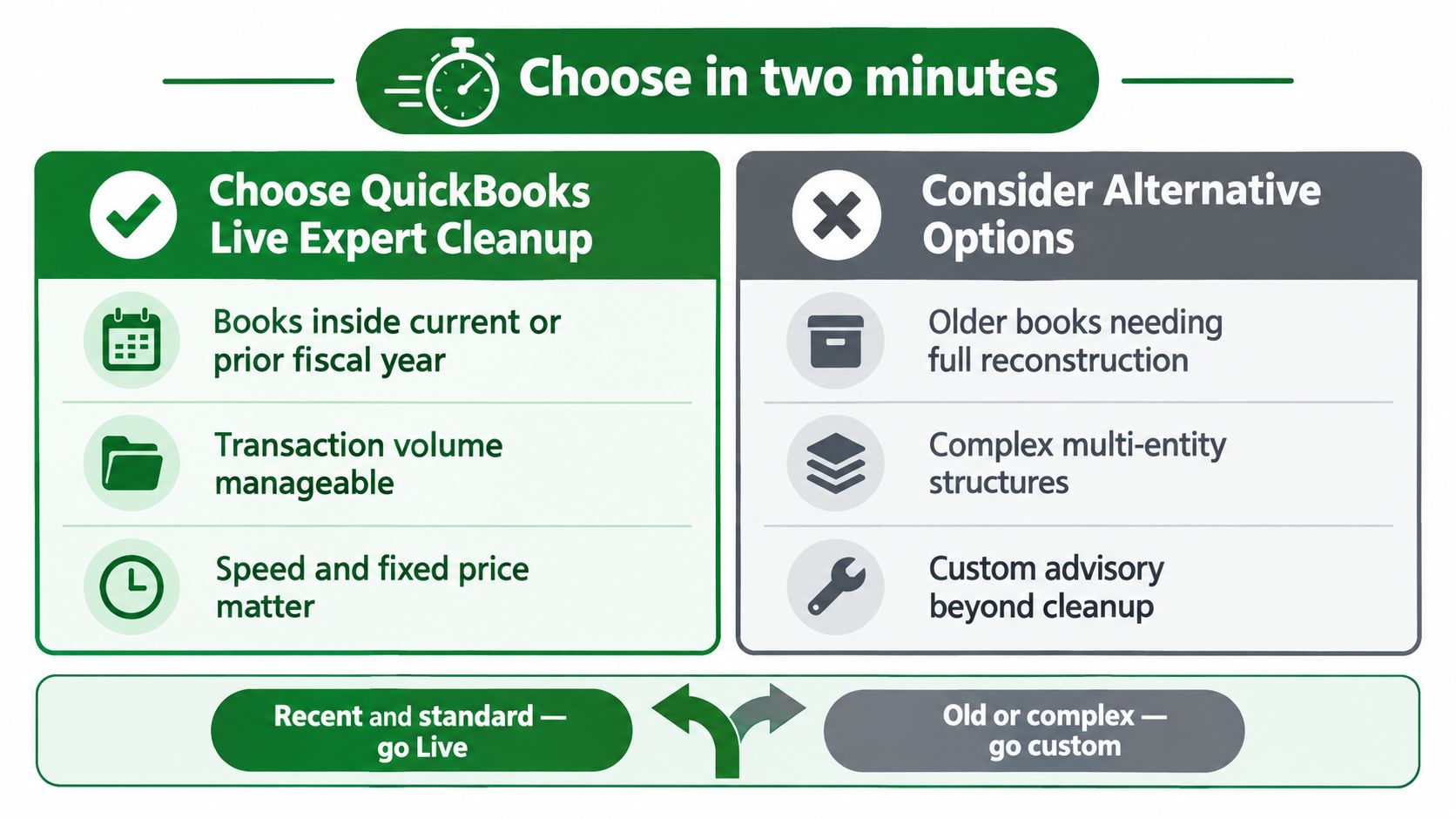
If your books need a contained correction inside QuickBooks Online, QuickBooks Live Expert Cleanup can be the right fit. Its boundaries are clear: onboarding lasts 60 days, work covers the current or prior fiscal year, and it does not include refiling tax returns.
Use QuickBooks Live when the file is recent, transaction volume is manageable, and the problems need a defined cleanup pass. The service works well for a limited backlog that can be corrected without rebuilding the company's accounting history.
Hire a third-party firm when the books extend beyond those boundaries, prior periods require reconstruction, or the account structure is complicated. A firm should diagnose the problems, correct them, coordinate unresolved issues, and own the engagement from start to finish.
The decision is simple: match the provider's scope to the condition of the books. QuickBooks Live is faster for a contained cleanup. A firm costs more, but it can take responsibility for work QuickBooks Live excludes.
If you need cleanup, catch-up work, or an accounting reset, Book Tech LLC handles projects in QuickBooks Online or Xero and can carry the records through reconciliation and tax preparation.