
Virtual Bookkeeping for Small Business: Costs and Choices

You're not behind on your books because you're careless. You're behind because customers, payroll, vendors and tax deadlines all feel more urgent than coding last month's card charges, until you need a number you can't trust. Virtual bookkeeping for small business works when it fixes that timing problem, not when it just moves messy records into cloud software.
Table of Contents
What Virtual Bookkeeping Covers and What It Does Not - The core monthly work
Why Small Businesses Move Their Books Online - What owners gain
What Virtual Bookkeeping Costs by Service Model - What pushes a quote up or down
Industry Workflows for Ecommerce, Construction and Services - Ecommerce needs settlement-level reconciliation - Turn A/R aging into a cash control
How to Choose a Virtual Bookkeeper Who Fits - Ask the AI question plainly
Decide Whether to Hand Off Your Books and How to Start - A practical onboarding sequence
What Virtual Bookkeeping Covers and What It Does Not for Small Business
It's Sunday evening. You're hunting for receipts, scrolling through bank feeds, and trying to remember whether April was profitable or whether deposits from March made it look better than it was. That's the moment most owners start looking for help.

Virtual bookkeeping is outsourced bookkeeping delivered remotely. A team works directly in QuickBooks Online or Xero, receives documents through a secure portal instead of email attachments, and closes your books on a schedule. Most small-business bookkeeping now runs inside cloud platforms like these, so a remote bookkeeper sees the same live ledger you do. What separates useful books from late ones is the discipline of the monthly close, and the scoreboard only helps if someone updates it before the game ends.
A tidy ledger alone doesn't collect a slow invoice.
The core job is the close plus the invoice-to-cash path: coded transactions, matched accounts, bills scheduled, receivables chased, then reports you can act on. Security and review rules carry the same weight as the software subscription, because portal access and approval rights decide who can move money and who can only record it.
The core monthly work
Transaction coding: Categorizing bank and credit card activity consistently, every week, rather than reconstructing intent at month end.
Reconciliation: Matching every bank and card account to statements, informed by modern approaches to reconciling payments that separate fees, refunds and settlements from revenue.
Bills and invoices: Managing accounts payable and accounts receivable, tracking sales tax where relevant, and posting payroll journal entries.
Close and reports: Closing the month and issuing a profit and loss statement, balance sheet and cash flow statement.
Filing tax returns, legal advice and strategic pricing decisions sit outside that scope. Those need a CPA or another advisor working from clean books. If you're still learning the underlying records, this quick guide to the basics of small business accounting covers the vocabulary in plain terms.
If the need is recording and reconciling, a bookkeeper fits. If the need is tax planning or financial strategy, add a professional on top of the bookkeeper.
Why Small Businesses Move Their Books Online
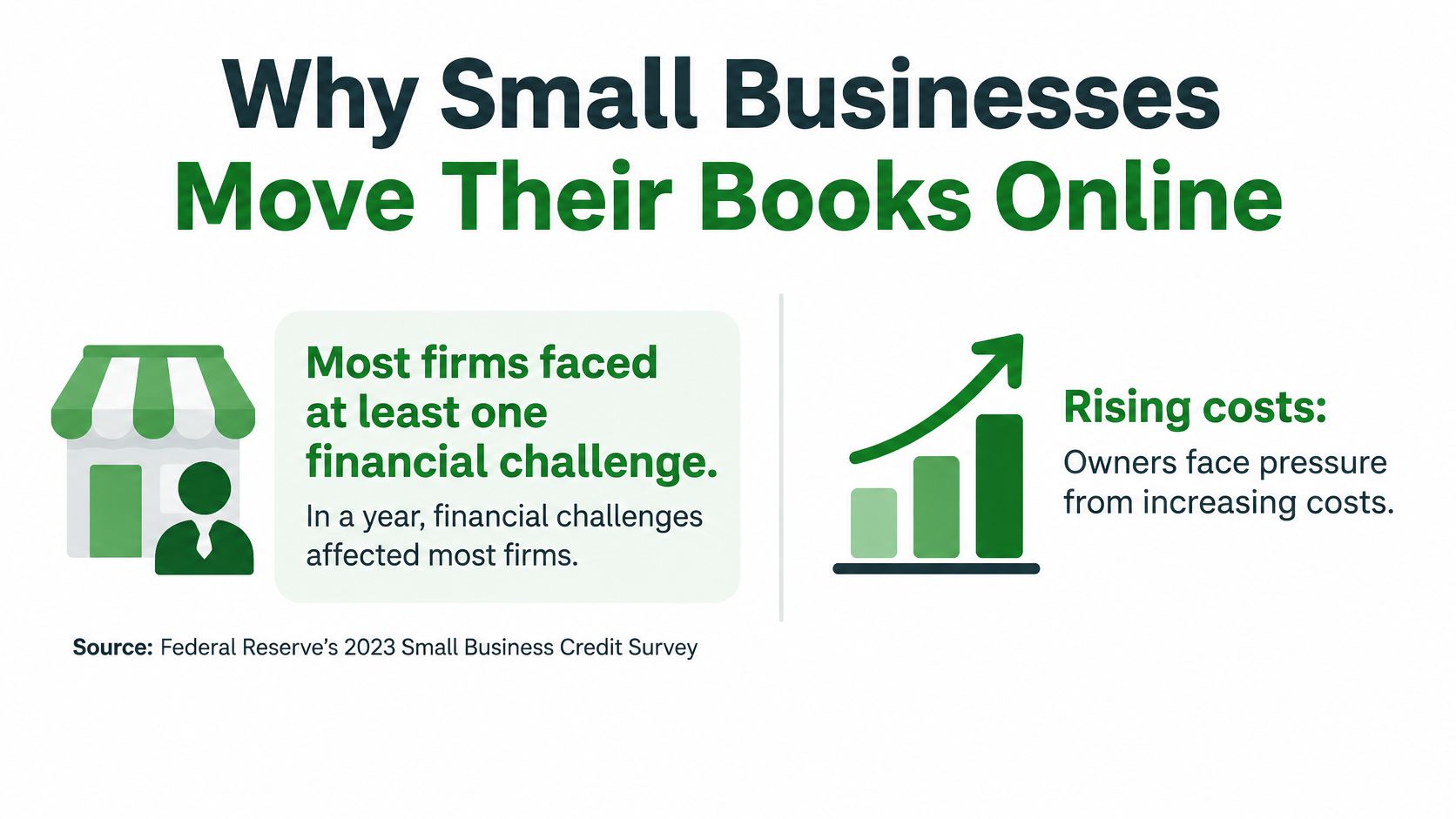
Payroll is due Friday, three customers are past due, and the bank balance only looks healthy because a sales tax payment has not cleared yet. That is usually when owners move their books online: cash pressure shows up weekly, while stale books hide it until the month is already gone. QuickBooks' review of small business cash flow problems reports that 94% of employer firms experienced at least one financial challenge during the preceding 12 months. The same source puts the share reporting rising costs of goods, services or wages at 81%, with 54% citing difficulty paying operating expenses and 54% reporting uneven cash flow.
A tidy ledger alone does not fix that. The payoff comes when the monthly close feeds the invoice-to-cash path: invoices go out promptly, deposits get matched, aging is reviewed, and someone owns the follow-up on slow payers. If the P&L lands on day 28 and nobody reads it, the books are clean and still useless.
What owners gain
Predictable monthly cost: A set fee instead of salary, payroll taxes, benefits, software and training for an in-house hire.
Backup coverage: The books continue when one person is on vacation or quits.
Faster monthly close: A 7 to 10 day close is realistic when documents arrive on time and reconciliations are not left for quarter end.
Specialist access: People who work daily in QuickBooks Online, Xero, payroll platforms and reporting, rather than one generalist learning on your file.
An in-house bookkeeper still makes sense when the job includes cash handling, inventory counts or front desk coverage. For pure bookkeeping, many small businesses pay for full-time capacity they use only a few days each month. Compare the fully loaded monthly cost, not the hourly wage.
The limits deserve the same honesty. Remote bookkeeping depends on you uploading documents on time and answering categorization questions while the purchase is still fresh in your memory. It also depends on review habits and access rules: who can see bank feeds, who approves payments, and who questions the numbers each month. Those disciplines matter as much as the subscription.
The gain is a monthly review while there is still time to chase an invoice, cut a cost or move cash before payroll.
What Virtual Bookkeeping Costs by Service Model
Pricing only makes sense when you match the model to your volume and complexity. Start with the model, then check what's included in the fee.
Service model | Best for | Typical price (US, approximate) | What is included |
|---|---|---|---|
Full-service monthly bookkeeping | Owners who want the books closed on schedule | $300-$800 for under 200 transactions a month; $800-$2,000 above that | Transaction coding, bank and card reconciliation, A/P, A/R, monthly P&L and balance sheet |
Catch-up or clean-up project | Books that are months behind or inconsistent | Quoted by months behind and accounts to rebuild | Rebuilt history, account-by-account reconciliation, corrected opening balances |
Payroll administration add-on | Businesses with employees or contractors paid through payroll | $50-$200 base plus per-employee fees | Pay runs, payroll tax deposits, payroll filings, year-end forms |
A/P and A/R management | Businesses with many bills or invoices | $200-$800 per month | Bill entry and payment runs, invoice creation, collection tracking and aging reports |
Review-only (hybrid) | Owners who code transactions in-house | $150-$500 per month | Monthly review, corrections, report walkthrough |
Quarterly review or advisory | Very low volume or DIY owners | $75-$250 per session | Software setup check, quarterly close review, tax-readiness check |
Those ranges are typical US market figures for small businesses. They vary with transaction volume, number of bank accounts, state sales tax filings and software complexity, so confirm them against written quotes. This breakdown of how much monthly bookkeeping costs helps you compare quotes on deliverables instead of headline price.
What pushes a quote up or down
Transaction count is the first driver. A salon with a modest number of monthly card transactions and a Shopify store processing thousands of orders aren't comparable files. The second driver is structure: number of bank and card accounts, inventory items, payment platforms and locations. Payroll inside the same engagement adds filings and deadlines. Backlog matters too, because clean-up work means rebuilding history before anyone can maintain it.
Take two examples. A service business with two bank accounts, one credit card and moderate monthly volume usually fits full-service bookkeeping at the low end of the range. An online seller with inventory, marketplace settlements and multi-state sales tax lands higher, and may still need a separate payroll add-on if it has employees.
Watch very low monthly prices closely. They often exclude reconciliation, A/R follow-up or month-end reports, which are the parts that tell you whether cash and profit agree. Ask for deliverables line by line: which accounts are reconciled, which reports arrive, what's the close date, and who answers questions.
Budgeting rule: Compare the monthly fee with the cost of your own hours, plus the cost of a late filing penalty or a cash shortage you spotted two weeks too late.
Security and Compliance Controls Worth Requiring
Treat your bookkeeping setup as an information system, not a shared spreadsheet. It holds bank feeds, payroll data, tax records and customer payment history. If access is sloppy, accurate reconciliations won't protect you.
The Federal Trade Commission guidance recommending encryption at rest and in transit, multifactor authentication and separate user accounts also calls for limiting access by job responsibilities and keeping offline or separately stored backups. NIST guidance points the same direction: least-privilege access, routine patching, activity logging, encrypted backups and a documented incident-response process.
The cause and effect is direct. Fewer privileges mean less financial and personal data is exposed if one credential is stolen. Separate, tested backups mean ransomware or an accidental deletion costs hours, not weeks of rebuilt records.
Control | What to confirm | Why it matters | Warning sign |
|---|---|---|---|
Multifactor authentication | MFA enabled on every bookkeeping, bank-feed and payroll login | Stops most account takeovers that start with a stolen password | Logins shared by username and password only |
Role-based access | Bookkeeper gets reconciliation and reporting rights, not payroll or payment rights | Limits what a compromised credential can reach | One shared admin login for the whole team |
Individual logins and offboarding | Each person has their own login, and access is removed the day a person or vendor leaves | Keeps an audit trail and closes old access | Former staff still have access months later |
Encrypted and separate backups | Backups encrypted and stored apart from the primary platform, with a tested restore | Keeps the books recoverable after ransomware or deletion | No backup policy, or backups only inside the same account |
Audit trail | Change history showing who edited, approved or deleted each transaction | Lets the owner see unexplained changes before tax time | Edits cannot be traced to a person |
AI and automation policy | Written list of tasks that may use automation and data that must never be uploaded | Prevents sensitive data from leaving approved systems | Vague answer or no policy |
Incident response | Documented steps for breach notice, account lockout and recovery | Shortens downtime and clarifies who calls whom | No written plan or no named contact |
Ask how the provider handles the audit trail in your accounting records, because you should be able to trace who changed a transaction and why. That matters during a dispute, a tax review or a simple internal mistake hunt.
Compliance is part of the same conversation. IRS guidance emphasizes supporting records for purchases, sales, payroll and other transactions, and books must be kept for the applicable tax period. Retention and document storage aren't housekeeping extras. They're part of the service.
Never share bank or payment credentials by email. Never let a former provider keep access after offboarding. Never upload sensitive files to unapproved automation tools because a workflow feels faster.
Industry Workflows for Ecommerce, Construction and Services
Here's a typical example. A Shopify seller keeps seeing bank deposits that look short every week, and sales in the store dashboard don't match cash in the bank. She assumes orders are going missing. Once her bookkeeper matches each payout to its settlement report, the gap turns out to be processor fees and refunds, not lost revenue. The sales were there all along. The recording was wrong.

Ecommerce needs settlement-level reconciliation
Matching deposits to invoices isn't enough for ecommerce. Reconcile at the settlement level. A control account should capture gross sales, refunds, sales tax, processor fees, chargebacks and the net deposit, tied to Shopify, Amazon or Stripe reports by date and batch. High-volume sellers benefit from weekly reconciliation. Monthly can work at lower volume, provided exceptions get documented before statements go out. Owners weighing their options can look at how ecommerce bookkeeping services handle settlements and inventory compared with basic transaction coding.
Industry | Core ledger structure | Reconciliation focus | Common blind spot |
|---|---|---|---|
Ecommerce (Shopify, Amazon, Stripe) | Gross sales, refunds, sales tax, processor fees, chargebacks and COGS by SKU | Marketplace or processor settlement reports matched to bank deposits | Fees and refunds recorded as lost revenue, or inventory valued incorrectly |
Construction | Job costing per project for labor, materials, equipment, subcontractors and overhead | Work-in-progress, retainage and subcontractor payments against invoices | Cost overruns that stay invisible until month-end |
Professional services and agencies | Client or project billing, retainers, and an A/R aging schedule | Invoice-to-cash matching with collection status for each client | Revenue recognized on paper while invoices remain unpaid for 30 days or more |
Construction runs on job costing. Each project needs its own view of labor, materials, equipment, subcontractors and overhead, plus work-in-progress and retainage. Skip that and a profitable-looking month can hide one job losing money while another carries it. I've seen owners discover a six-figure overrun only after the crew had already moved to the next site.
Services and agencies have a different blind spot. Time billing, project billing and retainers can book revenue long before cash arrives, and clean ledgers don't collect invoices. Someone has to own follow-up, document disputes and decide when a late payer gets new terms. Workflow ideas like those in the Finchum Fixes IT invoice automation guide can cut manual entry. Automation still won't make a client pay.
The short video below covers keeping reconciliation routine instead of treating it as a year-end rescue job.
Turn A/R aging into a cash control
Run the A/R aging report every week and group balances into current, 1-30, 31-60 and over-60-day buckets. Compare the overdue total with the next 30 days of expected cash needs. The 2025 Intuit QuickBooks Small Business Late Payments report found that 56% of US small businesses were owed money on unpaid invoices, averaging $17,500 per affected business, and 47% had invoices more than 30 days overdue. A weekly review is often the earliest cash warning you'll get.
Give each bucket an owner and a next action. Send a reminder at 1-30 days, call at 31-60 days, and pause new work or request a deposit past 60. Keep disputed invoices on a separate list so they're resolved on the merits rather than chased like ordinary delinquencies. Changing terms for chronic late payers is a business decision. Good aging data is what makes that decision clear.
How to Choose a Virtual Bookkeeper Who Fits
The cheapest quote and the best fit are rarely the same. A low price that excludes review, reporting or reconciliation just moves the work back to you. Score providers on whether they'll close on time, explain the numbers and protect your data.
Criterion | Green flag | Red flag |
|---|---|---|
Software expertise | Works daily in QuickBooks Online or Xero and names the reports it produces | Vague claim of software knowledge with no examples |
Close timeline | Commits to a monthly close in 7-10 days after statements are received | No timeline, or open-ended close dates |
Reporting package | P&L, balance sheet, cash flow and A/R aging each month, with a walkthrough | Only a raw transaction export |
Review cadence | Scheduled review meetings that turn numbers into decisions | Reports sent without any review |
Communication | Named contact and a stated response time through a secure portal | Only generic inbox or chat with no response standard |
Pricing transparency | Written scope listing what is and is not included | Low headline price with add-on fees for basics |
Staffing | US-based, in-house team with a named accountable person | Unclear staffing or offshore work with no disclosure |
Exit terms | Full data export on request and clear notice period | Data held hostage or long lock-in clauses |
Ask for credentials where they matter, such as QuickBooks ProAdvisor status, and references from businesses in your industry. A provider strong on ecommerce settlements may not understand construction retainage. If you're weighing local against remote options, this overview of bookkeeping services near you versus virtual delivery can help frame the trade-off.
Ask the AI question plainly
Automation can speed coding, but errors in sales tax, COGS, payroll liabilities, owner distributions or intercompany transfers create real tax and management problems. Ask which entries a human reviews before they post and what thresholds trigger approval. A provider should be able to describe those review rules in concrete terms. If the answer is "the software handles it," treat that as a red flag: someone needs to catch a miscoded payroll liability before it hits your books, and you need to know who that someone is.
Think about third-party risk at the same time. Your bookkeeper touches sensitive systems, so managing risks from outside providers belongs in the selection process, not after a problem. Book Tech LLC is one example of a fully virtual US-based provider offering monthly bookkeeping, clean-up, payroll administration and A/P and A/R management in QuickBooks Online and Xero, and it should be evaluated on these same criteria as any other firm.
When comparing quotes, put two realistic proposals side by side and check the scope line by line. A lower quote with no month-end review and no named contact may leave you doing the corrections yourself. Whether the higher quote saves owner time depends on what the written scope includes, so compare deliverables rather than headline prices. Before signing, ask for a sample monthly report and a sample reconciliation. If a provider can't show you what you'll receive, don't guess.
Decide Whether to Hand Off Your Books and How to Start
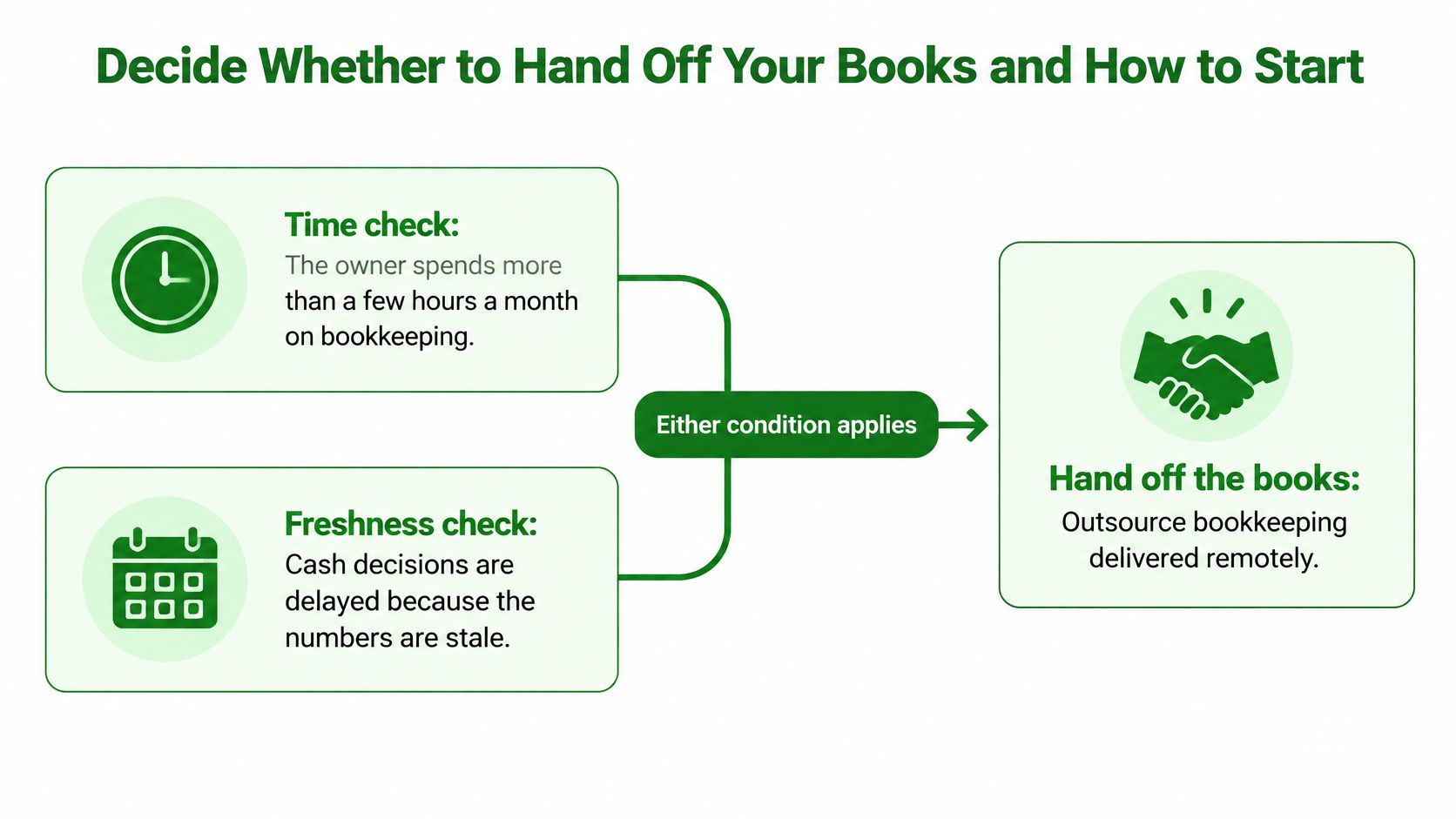
Use a simple decision rule. Hand off the books when you spend more than a few hours a month on bookkeeping, when cash decisions wait because numbers are stale, or when you have payroll, multiple accounts or inventory. Keep them in-house when volume is very low and you already reconcile and review reports every month without a backlog.
Neither answer is permanent. A solo consultant with a handful of invoices may be fine with review-only support for now. That same business with two employees, a line of credit and three payment platforms needs a different structure. Reassess when the work changes, not when tax season exposes the gap.
A practical onboarding sequence
Gather the records: Collect the last 12 months of bank and card statements, your most recent P&L and balance sheet, and the current A/R aging report.
Confirm the starting point: Agree on the chart of accounts and the cut-off date for handover so opening balances are clean.
Set access before data moves: Create role-based access and MFA for every user before connecting bank feeds or payroll.
Agree on outputs and approvals: Lock the close date, list the reports you'll receive, and set approval thresholds for large or unusual transactions.
Run the first month in parallel: Keep your own records for one cycle and compare outputs, so differences surface early.
Schedule the first review: Meet to walk the reports and agree on a written escalation rule for overdue invoices.
Don't skip the parallel month because onboarding feels slow. It's where miscoded owner contributions, duplicate vendor records and broken bank feeds show up while they're still cheap to fix. It's also where you learn whether communication works: who asks questions, how fast, and in what channel.
A tidy ledger alone won't fix slow-paying customers or overspending. The close, the aging review and your decisions on top of them do that work.
The first measurable result should be a closed prior month with reconciled accounts within the agreed timeline. You should also leave that first review with a clear view of cash for the next 30 days: what's owed to you, what's due from you, and which balances need action this week. If you can't answer those questions after the first close, the process needs work, not another software feature.
Start with the smallest handoff that solves the main bottleneck. For many owners, that's monthly reconciliation and reporting. For others, it's cleaning up A/R or separating ecommerce settlements properly. Get that running on schedule, review it every month, and add payroll, A/P or advisory support only when the numbers show you need it.
If your books are behind, your A/R aging isn't driving weekly cash decisions, or you don't have a reliable monthly close in QuickBooks Online or Xero, Book Tech LLC can handle monthly virtual bookkeeping, catch-up and clean-up, payroll administration and A/P and A/R management with reconciled, tax-ready reports. Visit Book Tech LLC to discuss your transaction volume, industry workflow and close timeline and get a clear scope before you hand anything off.