
Xero Accounting for Small Business: A Practical Guide

The books are already behind. A few receipts are still in your inbox, the spreadsheet stopped matching the bank balance, and the last bookkeeper left an accounting file nobody wants to touch. You don't need another dashboard that looks tidy while the records underneath it remain uncertain. You need a reliable workflow that keeps transactions current, gives someone clear responsibility for review, and produces financial statements you can use.
That's the practical promise of Xero accounting for small business. Xero gives an owner, bookkeeper, and accountant a shared cloud workspace. It doesn't decide whether a transaction is business-related, fix a faulty integration, or make an unreconciled balance trustworthy. Those outcomes depend on how you set it up and run it. If your chart of accounts needs a clean foundation first, start with this guide to setting up a Xero chart of accounts.
Table of Contents
Why Xero Is the Workspace Where Small Business Books Actually Get Done
What Xero Is and How It Became a Small Business Default - Why the cloud model matters to US businesses
The Day-to-Day Bookkeeping Workflow in Xero - Let routine work flow, but review the matches - Reconcile accounts on a defined schedule
Which Xero Plan Actually Fits a Small Business - Make the choice against real work
Why Connected Books Are Not the Same as Decision-Ready Books - Trace the money through the full transaction - Close the month before relying on the reports
Governing AI-Assisted Bookkeeping Inside Xero - Assign review by financial risk - Preserve accountability and the audit trail
Managing Xero In-House Versus Partnering With a Virtual Bookkeeper - Match support to complexity
The Three Decisions That Decide Whether Xero Actually Works for You
Why Xero Is the Workspace Where Small Business Books Actually Get Done
An accounting system works when the people responsible for the numbers can use the same current records. With a shared cloud workspace, an owner can send an invoice, a bookkeeper can review the bank activity, and an accountant can work from the same ledger rather than waiting for someone to email a spreadsheet. That shared context matters more than a long feature list.
Xero still needs a person to decide whether a charge is a business expense, whether a customer payment covers the right invoice, and whether a report is complete enough to guide a decision. The software can organize and surface information, but it can't supply missing judgment or documents. If nobody owns review, cloud access makes an incomplete set of books easier to access.
The working rule: Choose software for access, but build trust through clear ownership, regular reconciliation, and documented review.
The first decision is whether Xero's plan fits the business's transaction patterns and team. The next is how everyday work will move through bank feeds, invoices, bills, and reconciliation. Then set a month-end process that catches errors and defines when reports are ready to use. Finally, decide whether the owner has the time and accounting confidence to manage that process or should hand it to a professional.
That's the difference between buying accounting software and establishing a bookkeeping workflow. Xero can be the common workspace; your procedures make it dependable.
What Xero Accounting Is and How It Became a Small Business Default
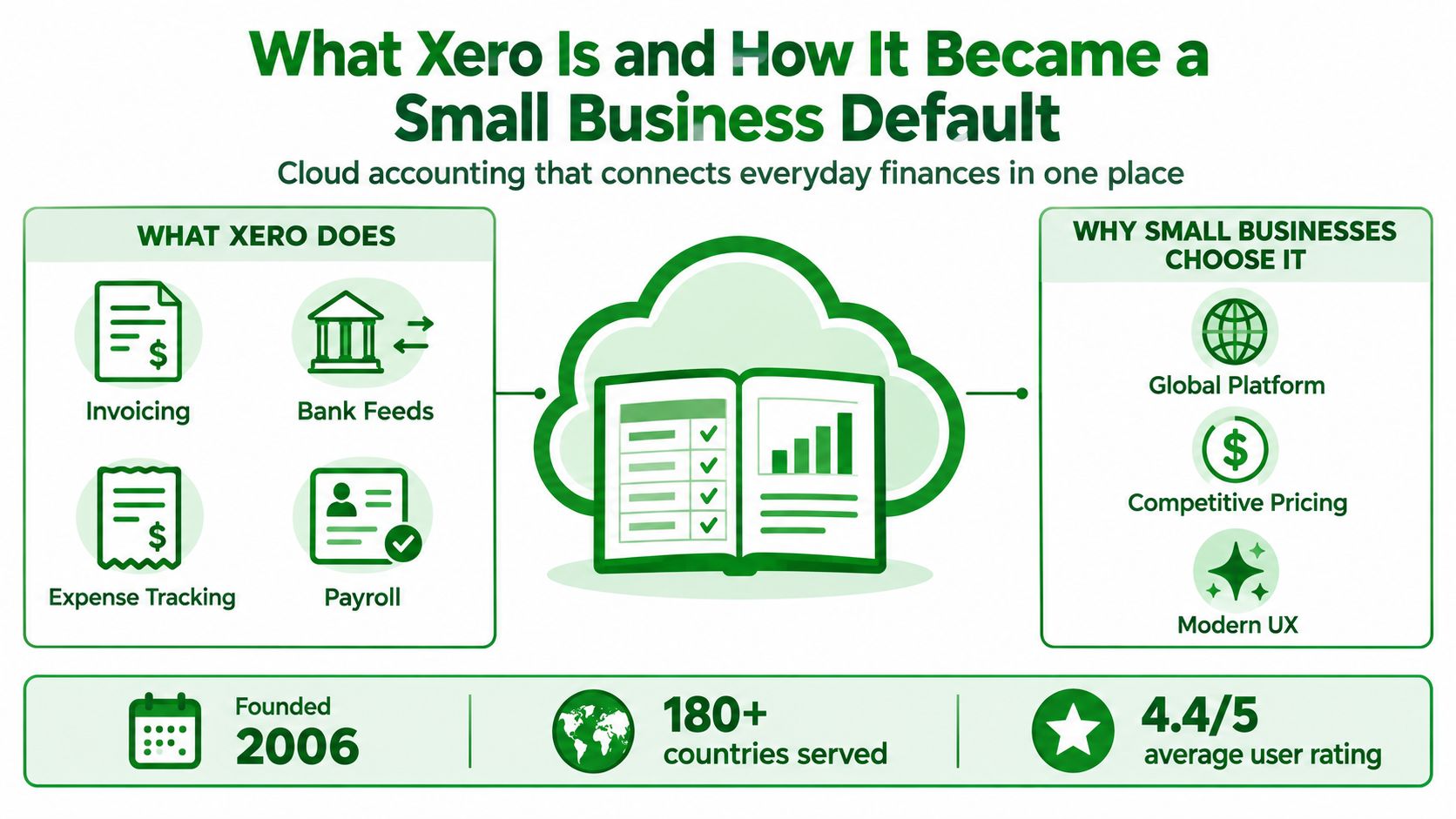
Xero is a cloud accounting platform for recording and managing business finances. Its small-business workflows include invoicing, bill management, connected bank transactions, reconciliation, and integrations with other tools. A published Accounting API also lets businesses connect operational software to their accounting records, provided the integration is mapped and reviewed properly.
Xero began in New Zealand in 2006. Its growth reflects the shift from bookkeeping built around desktop files and periodic handoffs to a shared system that owners and accounting professionals can access remotely. By 31 March 2025, Xero reported 4.4 million subscribers globally across Australia, the United Kingdom, the United States, and more than 180 other countries. During FY25, it added 414,000 net new subscribers before removing long-idle subscriptions, reported underlying subscriber growth of 10%, and recorded approximately NZ$2.1 billion in operating revenue, up 23% year over year or 20% in constant-currency terms, as detailed in Xero's FY25 results. These figures point to a widely established platform, not a small regional product.
Why the cloud model matters to US businesses
For a US small business, the appeal is operational. Owners, staff, and outside bookkeepers can work with current financial records without passing files back and forth. That supports virtual bookkeeping, where reconciliations and monthly reporting depend on timely access to shared information.
Cloud accounting is also a mainstream choice among US accounting practices. In a Quadrant Strategies survey of 250 accountants and bookkeepers working in US practices, conducted from 19 December 2024 through 8 January 2025, 85% of firms had embraced cloud platforms. Among reported benefits, 40% cited easier access to data from anywhere, and 36% cited enhanced security, according to Xero's US industry report. Cloud access doesn't remove the need for controls, but it gives a small business and its advisors a practical shared place to apply them.
The Day-to-Day Bookkeeping Workflow in Xero
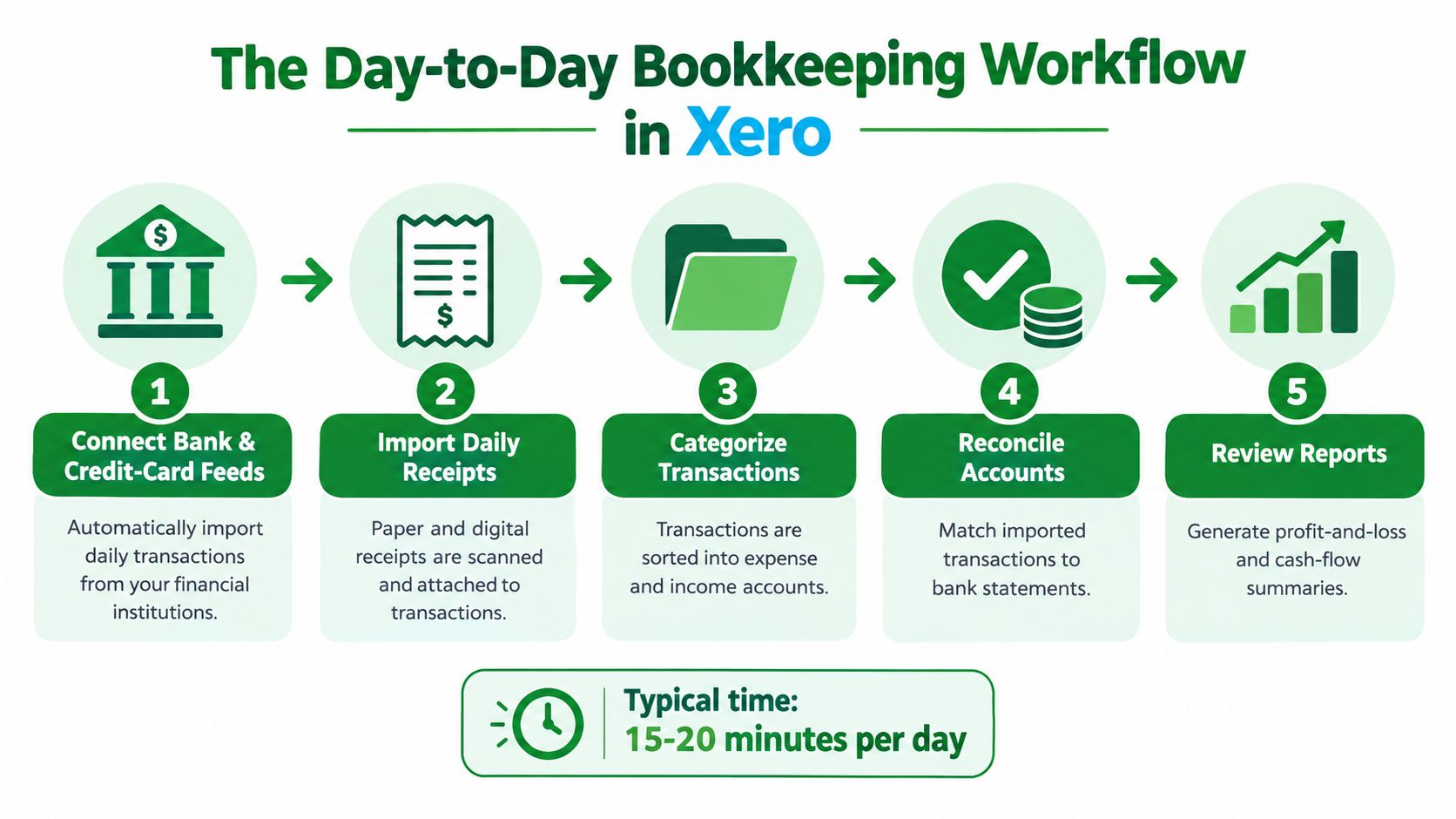
A useful routine starts with getting source information into Xero, then checking that what the software suggests matches what happened. Connect business checking and credit-card accounts, along with payment accounts where appropriate. Bank feeds import transaction data from connected financial institutions, reducing manual entry, but the feed alone doesn't prove a purchase was authorized or coded correctly.
Let routine work flow, but review the matches
When bank transactions arrive, Xero can suggest matches to invoices, bills, expenses, or transfers. Bank rules can help categorize recurring activity, such as a familiar subscription, once the rule is set up correctly. Before approving a match or rule, check the payee, amount, account, and supporting receipt. A recurring charge that changes purpose or amount still needs attention.
Issue invoices from Xero, track which customers have paid, and follow up on overdue balances. Enter bills with their due dates and supporting documents, then mark payments against the correct bills. Businesses with recurring software charges or usage-based subscriptions may also benefit from understanding invoice automation for SaaS billing, particularly when deciding how billing activity should connect to accounting records.
Reconcile accounts on a defined schedule
Reconciliation is the control step, not clerical cleanup. Bank data gives you an external record to compare with the ledger; matching reduces duplicate entry, while the reconciliation process can expose missing items, misclassifications, and timing differences. Review the suggested matches rather than approving everything in one sweep.
Reconcile checking, credit cards, savings accounts, and payment processors on a fixed weekly or monthly schedule. The adjusted-bank-balance check still applies: the statement balance plus deposits in transit minus outstanding checks should agree with the adjusted Xero balance. For practical guidance on the process, use this walkthrough of Xero bank reconciliation.
Which Xero Plan Actually Fits a Small Business
Don't pick the cheapest plan by default. Choose based on how you invoice, how much transaction activity you handle, and whether someone else needs access to manage the books. Xero's plan names and included features can change, so confirm current US plan details directly before subscribing. The table below is a decision framework, not a promise about current feature limits or prices.
Decision Criterion | Xero Starter | Xero Standard |
|---|---|---|
Business profile | Solo operator, freelancer, or very small shop | Business with regular invoicing or growing activity |
Transaction activity | Light and straightforward | More frequent transactions that need a consistent workflow |
Invoicing needs | Simple billing pattern | Regular customer invoicing and ongoing receivables follow-up |
Bookkeeping support | Owner manages the records | Bookkeeper or another team member participates in the process |
Recommendation | Choose when needs are genuinely basic | Choose when regular invoicing, added support, or growth makes a light setup restrictive |
Make the choice against real work
Starter can make sense for a solo consultant with a small number of straightforward transactions and no need for a more developed team workflow. Standard is the stronger default for a business that invoices regularly, is bringing in a bookkeeper, or expects transaction volume to grow. If quotes, recurring invoices, multiple users, or multi-currency activity matter to your business, verify which plan currently supports those requirements before you commit.
Payroll deserves a separate decision. Don't assume that selecting an accounting plan settles who runs payroll or how payroll activity will be recorded. Review your setup needs in this guide to Xero payroll, then confirm the available options for your business and location.
My recommendation is simple: buy for the workflow you need now, with enough room for the people who will maintain it. Moving to a more suitable plan is easier than running the business on a setup that forces workarounds from the start.
Why Connected Books Are Not the Same as Decision-Ready Books
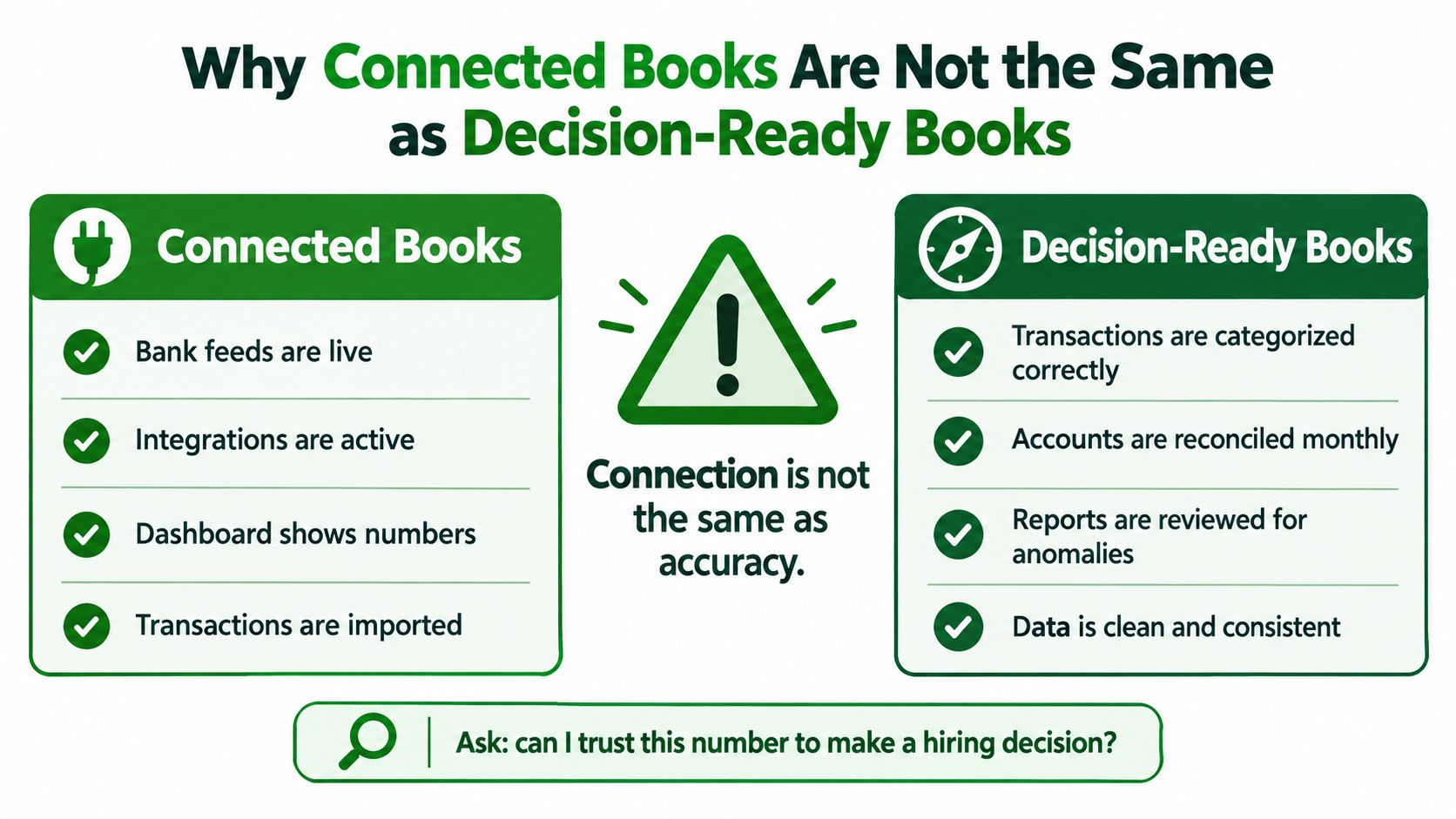
A live bank feed can put transactions on screen without making the books accurate. Integrations can import activity with the wrong account, duplicate a payout, or miss the reason a processor deposited a net amount rather than gross sales. That's a data-quality problem, not a sign that cloud accounting has failed.
Trace the money through the full transaction
For an online seller, Shopify, Amazon, or Stripe activity may include sales, fees, refunds, chargebacks, and deposits arriving on different timelines. If an integration records only the bank deposit without properly accounting for gross sales and fees, reported revenue and margins may be misleading. Inventory and cost of goods sold create another risk: sales activity and inventory records must be treated consistently for profit reports to make sense.
Tips, sales tax, refunds, and marketplace payouts need the same attention. An automated connection can move data quickly, but an incorrect mapping can spread the same mistake across many entries. The key question isn't whether the apps connect. It's whether source-system totals, clearing accounts, and Xero reports agree after review.
Close the month before relying on the reports
Set a 7–10 day monthly close and assign a person to each task. The exact calendar depends on how quickly bank, processor, payroll, and vendor data become available, but the steps should be documented:
Review the chart of accounts: Look for uncategorized transactions and accounts used inconsistently.
Reconcile cash and cards: Match bank and credit-card statements to Xero, investigating differences rather than forcing a match.
Reconcile processors: Compare sales, fees, refunds, chargebacks, and deposits to clearing-account activity.
Check receivables and payables: Review A/R and A/P aging for overdue items, duplicates, and bills missing support.
Review payroll and sales tax: Confirm liabilities, payments, and recorded obligations are consistent with source records.
Document variances: Explain unusual changes in revenue, expenses, margins, and cash before circulating reports.
For a deeper guide to turning reports into usable management information, review small business financial reporting. A connected ledger is a starting point. A documented close is what makes its numbers fit for decisions.
Governing AI-Assisted Bookkeeping Inside Xero
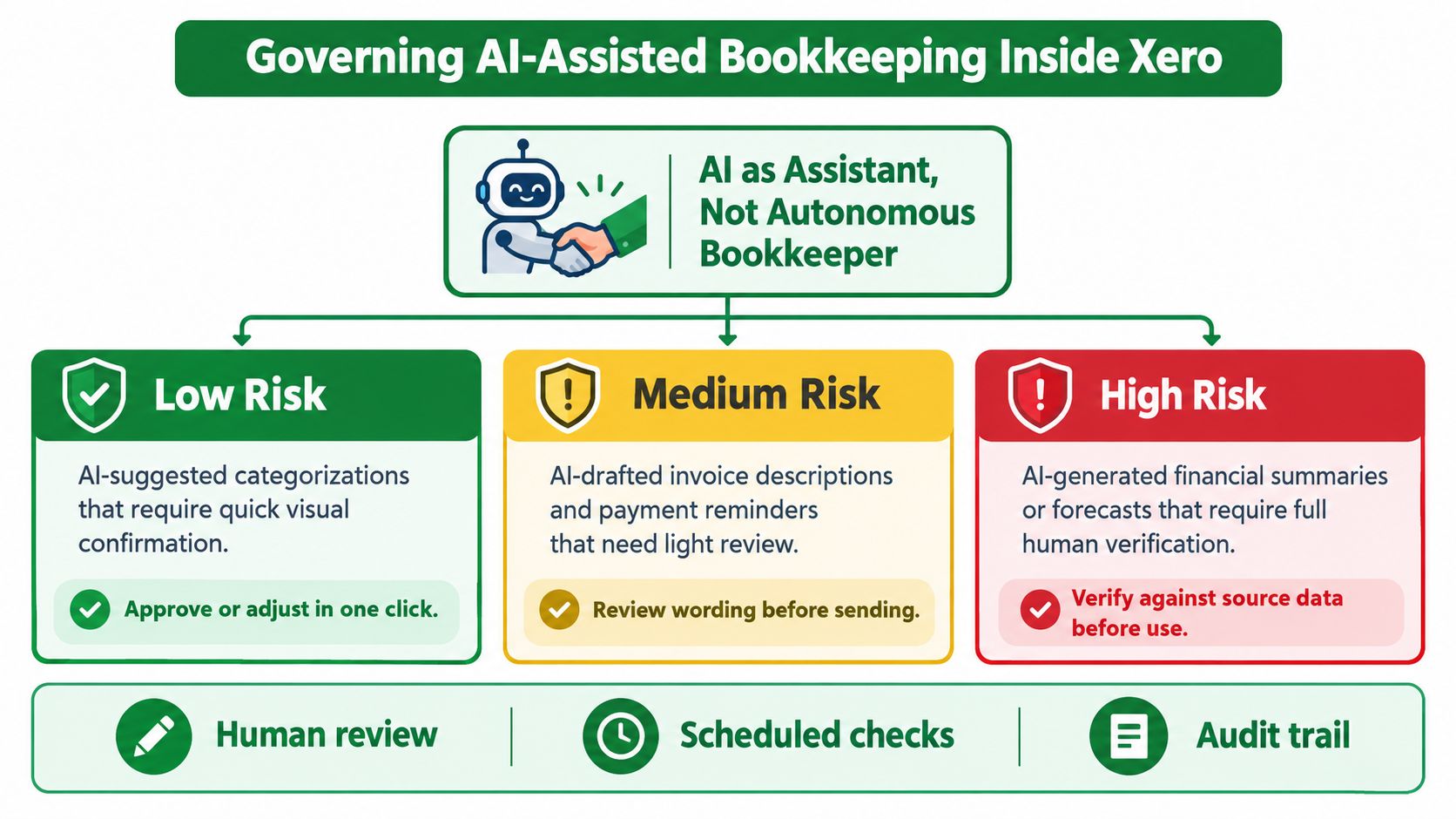
AI can suggest a category, draft text, or help surface patterns. Treat it as an assistant, not as the person accountable for the ledger. The right policy separates routine entries that need a quick check from transactions whose tax, payroll, inventory, or cash impact demands a human decision.
Xero research across 1,100 small businesses in the US, UK, and Australia found that 44% use AI weekly, while 19% use it weekly for bookkeeping; 65% believe AI will be central to operations within two years, according to Xero's research on AI in small business accounting. That difference matters. Businesses may adopt AI quickly, but adoption doesn't establish who reviews its output or who corrects an error.
Assign review by financial risk
A practical policy should make the review threshold explicit:
Lower risk: Let Xero suggest matches for familiar recurring subscriptions or routine bank-feed transactions. A person still checks that the vendor, amount, and account make sense.
Review before posting or sending: Check drafted invoice descriptions and payment reminders for correct customer details, amounts, and wording.
Human review required: Don't approve AI-generated entries affecting sales-tax coding, inventory and COGS, payroll liabilities, intercompany transfers, unusual vendor bills, refunds, or write-offs without comparing them to source documents.
If your business is exploring broader AI employees for Xero workflows, evaluate each proposed task against the same policy. A new automation should have an owner, a defined review method, and a way to spot exceptions before its work is treated as complete.
Preserve accountability and the audit trail
Write down who can approve transactions, who reviews exceptions, and who signs off on the close. For virtual teams, separate entry from approval where practical, and set approval limits that fit the business's risk. When someone corrects an AI-suggested entry, use Xero's available correction and history functions rather than deleting or replacing records in a way that obscures what changed.
The policy should answer one concrete question for each recurring task: Who reviews it, against what evidence, and what happens if it's wrong? That sentence is more useful than a blanket instruction to “use AI carefully.”
Managing Xero In-House Versus Partnering With a Virtual Bookkeeper
Managing Xero in-house works when the owner has time to keep records current, understands the transaction patterns, and will consistently review reconciliations and reports. It's less realistic when bookkeeping keeps slipping behind, customer balances go uncollected, payroll entries are unclear, or the owner can't explain what changed in the profit and loss statement.
The cost of doing it alone isn't limited to a software subscription. It includes the owner's time, the effort of catching up, and the risk of making decisions from incomplete records. A virtual bookkeeper can take responsibility for routine transaction handling, reconciliations, accounts payable and receivable, payroll administration, and financial statements. The useful deliverable isn't just “books updated.” It's a documented close with clear reports and a review process.
In-house Xero | Virtual bookkeeping partner |
|---|---|
Fits a straightforward business when the owner has consistent time and bookkeeping confidence | Fits a business whose transaction volume, complexity, or growth has outpaced the owner's capacity |
Owner handles source documents, coding, review, and follow-up | Bookkeeper maintains agreed workflows and reports exceptions |
Lower outside support needs, but the work can compete with sales and operations | Adds professional oversight and frees owner time, but requires communication and clear access controls |
Match support to complexity
High-volume e-commerce and retail businesses often need careful payment-processor, inventory, refund, and payout review. Professional services firms and freelancers may need dependable invoicing and receivables follow-up. Construction and real estate operators can face heavier payables and collections work, while multi-location businesses need consistent processes across sites.
When comparing providers, ask who performs the work, how often accounts are reconciled, what reports you'll receive, and how the close is reviewed. Outsourced bookkeeping for small business is worth reviewing if you're weighing outside support against keeping every task with the owner. Book Tech LLC is one option for businesses seeking remote Xero bookkeeping, reconciliations, financial reporting, payroll administration, and a defined monthly close.
The Three Decisions That Decide Whether Xero Actually Works for You
Xero succeeds when the business makes a few operating decisions and sticks to them. The plan, reconciliation cadence, and review policy should match the way money moves through your company. A low-cost setup with unclear ownership will not deliver dependable books.
Pick the plan for the actual workflow. Consider who invoices customers, how often transactions arrive, and whether a bookkeeper or another team member needs to work in the ledger. Confirm current plan features before subscribing.
Put reconciliation and close dates on the calendar. Choose a weekly or monthly reconciliation rhythm your team can maintain, then define who owns the 7–10 day close. Don't leave cleanup to “when things slow down.”
Write the review policy. Identify which bank-feed matches can be approved after a quick check, which integrations need periodic validation, and which entries require documented human review before reports are used for tax or business decisions.
This week, confirm the plan, schedule the reconciliation work, name the person responsible for close, and write down the AI and integration review rules. If your business involves rental income or property operations, use a resource on landlord bookkeeping basics to consider the records and workflows those activities require.
The practical standard is clear: every important account gets reconciled, unusual entries get investigated, and someone reviews the reports before you rely on them. If you can own that routine consistently, manage Xero in-house. If it keeps slipping, get help before the next backlog becomes a cleanup project.
Book Tech LLC provides virtual bookkeeping for US small businesses, including Xero setup and ongoing bookkeeping, reconciliations, payroll administration, and monthly financial reporting. If you want a structured close and books you can use with confidence, talk with Book Tech LLC about a workflow that fits your business.