
Xero Payroll: Features, Pricing, and Setup Guide
You're staring at a payroll deadline with hours still waiting for approval, a new employee's details missing, and a tax table update you haven't reviewed. The software may calculate the pay run, but it won't remove the responsibility to check whether the rules, employee records, account mappings, and payment schedule are still correct.
That's the core question behind Xero Payroll. It isn't about whether the platform can process wages. It's whether it fits your country, accounting workflow, team structure, compliance obligations, and willingness to monitor changes throughout the year. Xero has built payroll into a broad financial ecosystem, but payroll remains an area where a small setup error can affect employees, tax filings, cash flow, and financial reports.
Table of Contents
Why Small Business Owners Are Rethinking Payroll - Payroll is a financial control
Core Features and Supported Regions - What the workflow should handle - Regional availability
Understanding Xero Payroll Pricing and Plan Changes - Price the complete workflow
Compliance Risks and Mid-Year Tax Table Updates - Audit every recurring pay run
Integrating Payroll with Xero Accounting Workflows - The five-point bookkeeping flow
Xero Payroll Versus Outsourced Bookkeeping Partners - Decision matrix
Next Steps and Frequently Asked Questions - Frequently asked questions
Why Small Business Owners Are Rethinking Payroll
A small business owner may begin payday by checking timesheets and end it by correcting a deduction that looked wrong on an employee's payslip. Between those tasks, they may need to confirm salary changes, record leave, approve payments, reconcile the bank account, and make sure the payroll records agree with the books. Payroll feels routine until an employee is paid incorrectly or a filing deadline is missed.
The operational burden grows when payroll sits apart from bookkeeping. The owner has one system for accounting, another for hours, another for benefits, and perhaps a separate bank payment process. Each handoff creates another opportunity for an amount, date, or employee record to be entered incorrectly. That's why payroll software should be judged as part of the financial workflow, not as an isolated calculator.
Xero was founded in 2006, listed on the New Zealand Stock Exchange in June 2007, and listed on the Australian Securities Exchange in November 2012. By FY24, it reported 4.2 million global subscribers and $1.7 billion in operating revenue, placing payroll within a sizeable accounting platform rather than a standalone payroll product. Xero's company factsheet also says the platform serves customers in over 180 countries and supports more than 1,000 third-party app integrations.

Payroll is a financial control
Xero identifies payroll as one of the three most critical jobs to be done in its three largest markets, Australia, the UK, and the US, alongside accounting and payments. That positioning matters. Payroll affects labour costs, liabilities, cash requirements, management reporting, and employee trust.
For owners comparing providers, practical payroll guidance should cover both software operation and legal obligations. A useful starting point is this resource on HMRC-compliant payroll for small teams, particularly for UK employers assessing whether their internal process is sufficiently reliable.
If you're still learning the fundamentals, use this small business payroll guide to map responsibilities before choosing a platform.
Practical rule: Choose payroll software for the process you can maintain every pay period, not the demo you enjoyed once.
Xero's history also shows that payroll has been a strategic capability for well over a decade. Its expansion included payroll services in four major markets and the acquisition of Seattle-based online payroll company Monchilla. The product has therefore developed within a wider accounting strategy, but local rules still determine whether the experience is native, integrated, or partner-led.
Core Features and Supported Regions
Xero Payroll's useful features depend heavily on the market attached to your organisation. In a supported native market, payroll can connect employee records, earnings, deductions, leave, tax calculations, pension or retirement obligations, payslips, filings, and accounting entries. In a partner-led market, Xero may remain the accounting centre while another provider supplies the payroll engine.
That distinction should come before feature comparisons. A familiar interface doesn't guarantee that the payroll service handles your local filings or employment rules.
What the workflow should handle
A properly configured payroll workflow generally begins with employee information, pay frequency, compensation, deductions, leave, and relevant employer settings. You then review each pay run, confirm changes, approve it, complete the required filing or payment steps, and reconcile the resulting entries in the ledger.
Look for these capabilities when assessing fit:
Employee records: Store pay information and details needed for recurring payroll.
Pay calculations: Apply earnings, deductions, leave, and applicable withholding rules.
Payslips and employee access: Give workers a clear record of their pay and deductions where the regional product supports those functions.
Tax and statutory processing: Support the filings and calculations required in that market, either natively or through an integrated provider.
Payments: Check whether direct deposit, payment files, or another payment method is available for your region and plan.
Contractor handling: Confirm whether contractor payments are included in the relevant payroll service or require a separate workflow.
Accounting integration: Map wages, taxes, benefits, and liabilities to the correct ledger accounts.
The Xero bookkeeping services overview is useful for seeing how payroll administration fits alongside reconciliations and ongoing bookkeeping rather than operating as a separate task.
Regional availability
Xero's payroll footprint is global but concentrated in major English-speaking markets. A 2025 market dataset tracked Xero financial-reporting users across 195 countries, with particularly strong representation in Australia, Singapore, the UK, and the US. It listed more than 20,797 companies using Xero for financial reporting, and payroll appeared among the three leading related services, with 732 tracked payroll-linked customers in that dataset. Apps Run The World's Xero Payroll customer data provides that market view.
Region | Payroll model | Key features and fit |
|---|---|---|
New Zealand | Native payroll | Xero product coverage indicates direct local payroll support, subject to the applicable plan and rules. |
United Kingdom | Native payroll | Xero product coverage indicates direct payroll support for UK employers, including local compliance workflows. |
United States | Partner-led model | US payroll is delivered through a partner model. Xero says payroll isn't available for mobile subscribers. |
Australia and other markets | Market-dependent | Confirm the local Xero edition, payroll availability, and compliance coverage before committing. |
The same dataset showed the largest country shares for Xero financial-reporting users in the United Kingdom at 6,062 customers, Australia at 5,742, and the United States at 3,368. Those figures describe tracked Xero financial-reporting users, not total payroll users, so don't treat them as a payroll market-share measure.
The practical recommendation is simple. Verify the payroll model for your legal employer, not merely the country where your business operates. A US company using Xero may need a partner payroll product, while a UK or New Zealand company may use native payroll with a different pricing structure.
Understanding Xero Payroll Pricing and Plan Changes
Xero Payroll pricing is not a single global schedule. The total cost depends on your accounting subscription, whether payroll is included or added separately, the number of employees, the availability of the regional product, and whether a partner supplies the payroll service.
That makes generic pricing tables risky. A price shown for one country can mislead an owner in another country, especially after plan restructuring.
Xero's updates describe major plan changes in the UK and New Zealand. Payroll has become an add-on priced per employee on several plans, and the included entitlements across plans have been revised. In other words, the old assumption that payroll automatically comes bundled with an accounting subscription may no longer hold for every customer or plan.
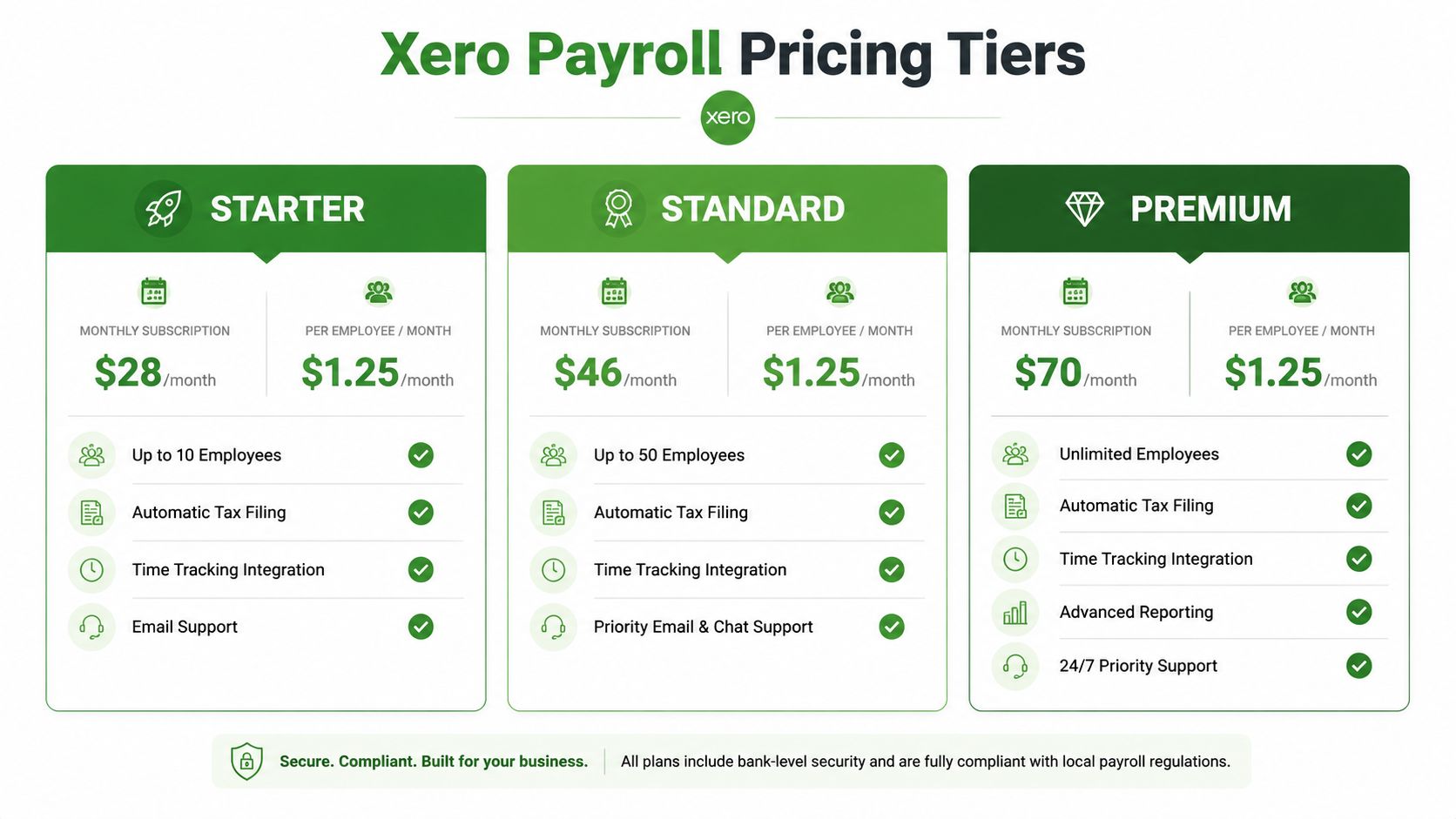
Price the complete workflow
Don't budget from the subscription name alone. Build the cost around the work your business performs:
Accounting subscription: Identify the Xero plan required for your bookkeeping, invoicing, reporting, and bank feeds.
Payroll access: Check whether payroll is included, restricted, or sold as an add-on in your market.
Employee charges: Confirm whether payroll is priced per employee and whether all workers count under the relevant terms.
Partner fees: In the US, assess the cost and terms of the partner-led payroll service rather than assuming native Xero pricing applies.
Implementation: Include setup, opening balances, account mapping, employee data, and migration review.
Ongoing oversight: Allow for bookkeeping or payroll support if your team can't reliably review every pay run and rule update.
For US small businesses, Xero launched Xero Payroll powered by Gusto on 12 August 2026, according to Xero's product update. The same update says payroll isn't available for mobile subscribers. Since the US model is partner-led, evaluate feature access, employee pricing, filing coverage, support responsibilities, and how payroll data posts into Xero before you select it.
Budgeting principle: The payroll bill is only one part of payroll cost. Your exposure also includes setup time, correction work, missed filings, and the owner's hours spent monitoring changes.
Watch pricing volatility closely if your headcount is changing. A plan that looks sensible for a small team can become less attractive when each additional employee creates a separate payroll charge. For a comparison with another major accounting platform, use this Xero versus QuickBooks analysis, then verify current regional terms directly before signing up.
Compliance Risks and Mid-Year Tax Table Updates
The most dangerous payroll assumption is that a recurring pay run remains correct because it worked last month. Payroll rules can change during the year, and a pre-created or scheduled run may still require active review. Software automation reduces repetitive entry, but it doesn't transfer accountability away from the employer.
Recent Xero guidance identifies several 2025 to 2026 changes that require attention. These include updated tax tables, the removal of EYU acceptance from 6 April 2026, and Payday Super beginning 1 July 2026, with contributions due within seven business days of payday. Xero's year-end and FY27 payroll guidance sets out those changes.
Audit every recurring pay run
Treat a rule change as a control event. Don't wait for an employee to question a payslip.
Review updated tax tables: Confirm the system has applied the current rules and check the effective date against the pay period.
Check statutory changes: Review changes affecting deductions, holidays, pensions, superannuation, or employer reporting.
Adjust schedules: Inspect automatic pay runs and confirm their dates, pay periods, and approval settings.
Notify employees: Explain material changes to deductions or retirement contributions before employees receive confusing payslips.
Verify system updates: Check the payroll version, integration status, filing result, and any alerts after an update.
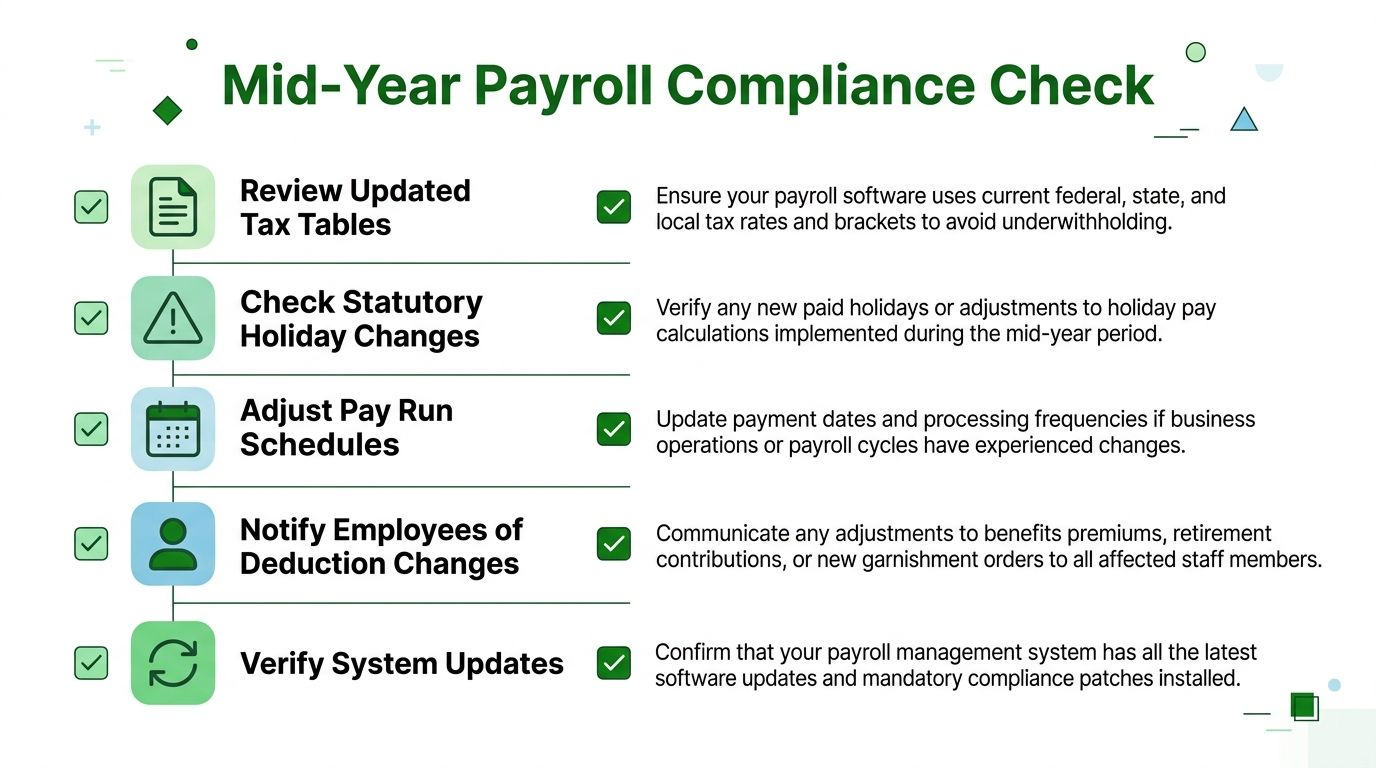
The highest-risk point is often the first pay run after a rule change. Compare gross pay, taxable pay, deductions, employer obligations, and net pay with the prior period. Investigate differences that don't have a clear explanation, especially after changing tax tables or employee settings.
If an employee has a wage levy or garnishment, keep the deduction logic and supporting documentation under review. A specialist resource such as this stop IRS wage garnishment guide can help frame the issue, but it shouldn't replace advice from the relevant authority or payroll professional.
Maintain an audit trail for changes, approvals, corrections, and filings. This guide to defining an audit trail explains why the record matters when you need to establish who changed a setting and when.
Control point: Never approve a changed payroll run solely because the software produced it automatically. Review the rule, the date, and the employee impact.
Integrating Payroll with Xero Accounting Workflows
Payroll should feed the ledger without creating a second bookkeeping project. Once a pay run is finalized, the business needs accurate records for wages, employer taxes, benefits, deductions, and payroll liabilities. Those entries influence the profit and loss statement, balance sheet, cash planning, and month-end reconciliation.
The quality of that integration depends on account mapping. If wages post to the wrong expense category, or liabilities land in an inappropriate account, the payroll may be correct while the financial statements are not. That creates extra work during reconciliation and can distort decisions about labour costs.
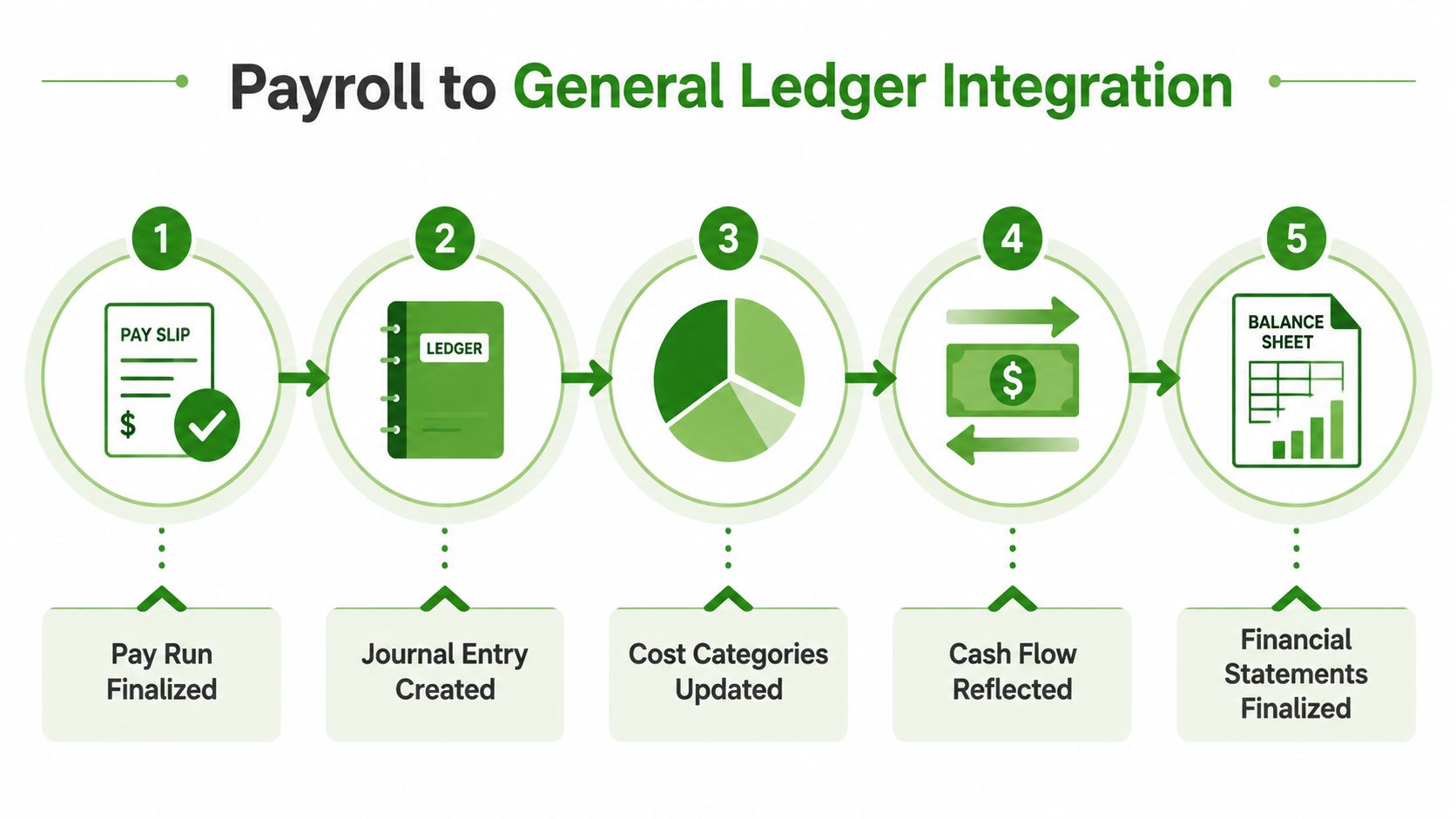
The five-point bookkeeping flow
First, finalize the pay run. Review hours, salary changes, leave, deductions, and employer obligations before approval.
Second, post the journal entry. Payroll should create or feed the relevant accounting entries so the ledger reflects the approved run.
Third, review cost categories. Check departments, locations, projects, or classes if your reporting structure uses them. A construction company may need labour separated by project, while a professional services firm may focus on billable versus administrative staff.
Fourth, reconcile cash and liabilities. Match the bank payment to the payroll records and track unpaid taxes, benefits, retirement contributions, or other liabilities until settlement.
Finally, read the statements. Payroll should appear consistently in the profit and loss statement and balance sheet. Use the result to assess cash needs and labour trends, not merely to confirm that the pay run posted.
Xero's ecosystem supports more than 1,000 third-party app integrations, according to Xero's company factsheet. That breadth can connect time tracking, expenses, payments, and industry tools, but each integration adds a control point. Decide which system owns employee hours, which system approves changes, and which record is authoritative when two systems disagree.
For broader context on payroll tax obligations, owners can browse small business payroll tax insights from Tax Attorney Stephen A Weisberg. The central bookkeeping lesson remains practical: reconcile payroll as part of the close, not as an afterthought after financial statements are already prepared.
Xero Payroll Versus Outsourced Bookkeeping Partners
Xero Payroll can be a sound DIY choice when the business has a small team, consistent pay, straightforward deductions, and an owner or administrator who will review every pay run. The software can reduce repetitive entry and connect payroll with accounting. It doesn't eliminate the need for policy decisions, recordkeeping, compliance review, or exception handling.
Outsourcing becomes more sensible when payroll complexity competes with revenue-generating work. Multi-state employees, variable hours, commissions, bonuses, benefits, garnishments, multiple locations, and frequent staff changes all increase the number of details someone must verify. A low software fee can become expensive if the owner spends every pay period troubleshooting or correcting books.
Decision matrix
Business situation | DIY Xero Payroll | Outsource payroll and bookkeeping |
|---|---|---|
Small team with stable pay | Reasonable if one person owns the process and reviews each run | Useful for setup or periodic review |
Variable hours and frequent adjustments | Possible, but requires disciplined time approval | Better when exceptions consume owner time |
Multiple states or jurisdictions | Use only after confirming partner coverage and filing responsibilities | Stronger fit when compliance coordination is difficult |
Mid-year system migration | Risky without accurate opening balances and review | Appropriate for conversion, testing, and first-run oversight |
Owner wants current financial statements | Requires consistent reconciliation after each run | Helpful when payroll must feed reconciled books |
Rapid hiring or changing compensation | Demands frequent record maintenance | More scalable when payroll administration grows with the team |
The right comparison isn't software versus people. It's internal control versus external accountability. You can run payroll yourself and still hire a professional to review setup, account mapping, tax settings, and the first changed-rule pay run.
Book Tech LLC is one outsourced option for businesses using Xero. Its services include monthly bookkeeping, catch-up and cleanup work, payroll administration, and accounts payable and receivable support, with reconciliations and tax-ready records. Review its outsourced bookkeeping services for small businesses if you want payroll handled within the same financial workflow.
Decision test: If you'd struggle to explain why this month's payroll liability changed, you need either stronger internal review or professional support.
Next Steps and Frequently Asked Questions
Start by identifying your legal employer location, payroll frequency, employee count, compensation types, and current payroll provider. Then verify whether Xero offers native payroll in your market or uses a partner model, review the current plan terms, and list every filing and payment responsibility that will remain with you.
If you're switching systems during a tax year, gather year-to-date payroll records before entering opening balances. Test account mappings, confirm employee details, run a controlled first payroll, reconcile the journal, and document who approves future pay runs.
Frequently asked questions
Can Xero Payroll handle contractors?Contractor support depends on the regional payroll product and partner arrangement. Confirm whether contractor payments, reporting, and tax documentation are included before assuming employee payroll features apply.
What happens if I run payroll in multiple states?You'll need to verify that the US partner-led service covers each state and local obligation relevant to your employees. Don't rely on the accounting platform alone to determine your filing responsibilities.
Can I move from another payroll system mid-year?Yes, but migration requires accurate year-to-date figures, employee records, prior filings, and opening balances. Have the conversion reviewed before the first Xero pay run, because errors can flow into later reporting.
Should I use Xero Payroll or outsource?Use DIY payroll when the process is simple and someone has time to review it consistently. Outsource when complexity, compliance updates, migration work, or owner workload makes regular control difficult.
What should I do first?Create a regional requirements checklist, confirm pricing, document the payroll-to-ledger workflow, and schedule a recurring compliance review rather than treating setup as a one-time task.
Book Tech LLC provides Xero-focused bookkeeping, payroll administration, reconciliations, and tax-ready financial reporting for small businesses that need payroll connected to accurate books. Visit Book Tech LLC to discuss your payroll workflow and determine whether setup support, ongoing administration, or full bookkeeping assistance fits your business.