
Accounts Receivable Reconciliation: A Guide for 2026
It's the last day of the month, your invoice log says customers still owe money, the bank feed shows deposits that don't line up, and your balance sheet looks off by just enough to make you uneasy. That's the moment most owners realize accounts receivable reconciliation isn't a back-office chore, it's the only thing telling you whether your customer balances, cash receipts, and revenue entries belong where they're sitting.
If you've ever wondered why one report says you're owed one amount and another says something different, you're already close to the core of the issue. Accounts receivable reconciliation is the process of matching your AR subledger or aging report to the AR balance in the general ledger, then clearing differences until the totals agree, which is why a zero variance is the finish line in most guidance Atlar's AR reconciliation guide. For a quick refresher on how this sits alongside the rest of your books, the plain-English overview of accounts receivable vs payable is useful, because AR is money customers owe you, not money you owe out.
When the match is clean, the payoff is practical. You get a balance sheet you can trust, cash-flow forecasts that don't overpromise, and tax-ready financial statements that don't need a scramble at filing time. If you want the broader context on aging buckets, the accounts receivable aging report guide connects directly to what you're comparing here.
Table of Contents
Understanding Accounts Receivable Reconciliation and Why It Matters - What the reconciliation is really checking - Why the balance sheet is only part of the story
Preparing for Your Accounts Receivable Reconciliation - A clean setup looks like this
The Step-by-Step Accounts Receivable Reconciliation Process - Start with the records that should match - Work through the mismatch with a decision order - Fix the variance and document the trail
Reconciling Accounts Receivable in QuickBooks Online and Xero
Building Your Accounts Receivable Reconciliation Checklist and Cadence - A practical checklist you can reuse - What to watch after the tie-out
Troubleshooting Common Accounts Receivable Reconciliation Errors - When modern payment stacks are the real problem - Common fixes that actually work
Taking Your Accounts Receivable Management to the Next Level - Where automation helps and where it doesn't
Understanding Accounts Receivable Reconciliation and Why It Matters
A small business owner usually feels AR problems before they can name them. A customer swears they paid, the processor says a payout is coming, the bank shows a deposit, and your books still show an open invoice. That's not just annoying, it's a sign your receivables records and your general ledger have drifted apart.
What the reconciliation is really checking
At its simplest, accounts receivable reconciliation asks one question, do the invoices, payments, and credit memos in your AR detail agree with the AR control account in the GL? The practical answer comes from comparing unpaid invoices, cash receipts, and credits, then posting correcting entries until the two totals match Atlar's explanation of AR reconciliation. That zero-variance outcome matters because it confirms revenue-related entries landed in the right period and customer balances weren't misstated.
Practical rule: if the AR detail and the GL don't agree, treat it as a control issue first, not just a cleanup issue.
The reason this matters goes beyond tidy books. Clean AR affects cash visibility, tax readiness, and whether you can answer a lender's questions without guessing. It also keeps overdue balances from being buried, which matters because unresolved receivables get harder to collect over time APQC benchmark summary.
Why the balance sheet is only part of the story
Reconciliation also tells you whether your operating systems are talking to each other correctly. If an invoice is in one system, a processor payout is in another, and the bank feed lands later, your books can look correct on paper while still hiding a real operational mismatch. That's why this process belongs in every close, not only at tax time.
For a solo owner or a small team, the control value is immediate. A clean reconciliation gives you a reliable starting point for aging follow-up, cash planning, and financial statements you're willing to sign your name to.
Preparing for Your Accounts Receivable Reconciliation
The easiest reconciliation is the one that starts with clean inputs. Before you compare anything, make sure every invoice is recorded, bank feeds are current, and you're pulling reports for the same cutoff date. If even one report is from a different day, you're likely comparing a moving target instead of a real balance.
The main reports to gather are the aged AR subledger, the AR control account from the GL, and any supporting payment records that explain outstanding items. The trial balance matters here because it's the report that shows whether the control account is sitting where it should in the ledger trial balance overview. Keep the files in one folder or one close package so you're not hunting for screenshots and exports while the books are already under pressure.
A clean setup looks like this
Lock the cutoff date: Pull every report as of the same close date, not “around month end.”
Confirm invoice completeness: Check that new invoices, credit memos, and cancellations are recorded before you start.
Refresh bank data: Make sure recent deposits, processor payouts, and ACH activity are fully synced.
Save exports immediately: Keep PDFs or CSVs together so you can trace every number later.
Name your files clearly: Use the close date in the filename so next month's review is faster.
Missing timing alignment is one of the most common reasons a reconciliation looks wrong when it actually isn't.
A good prep routine also prevents the end-of-month scramble. If you close monthly, gather the reports on the same day every time and store the support in the same structure. That discipline makes it much easier to spot whether a difference is caused by timing, missing posting, or something that needs a journal entry.
The Step-by-Step Accounts Receivable Reconciliation Process
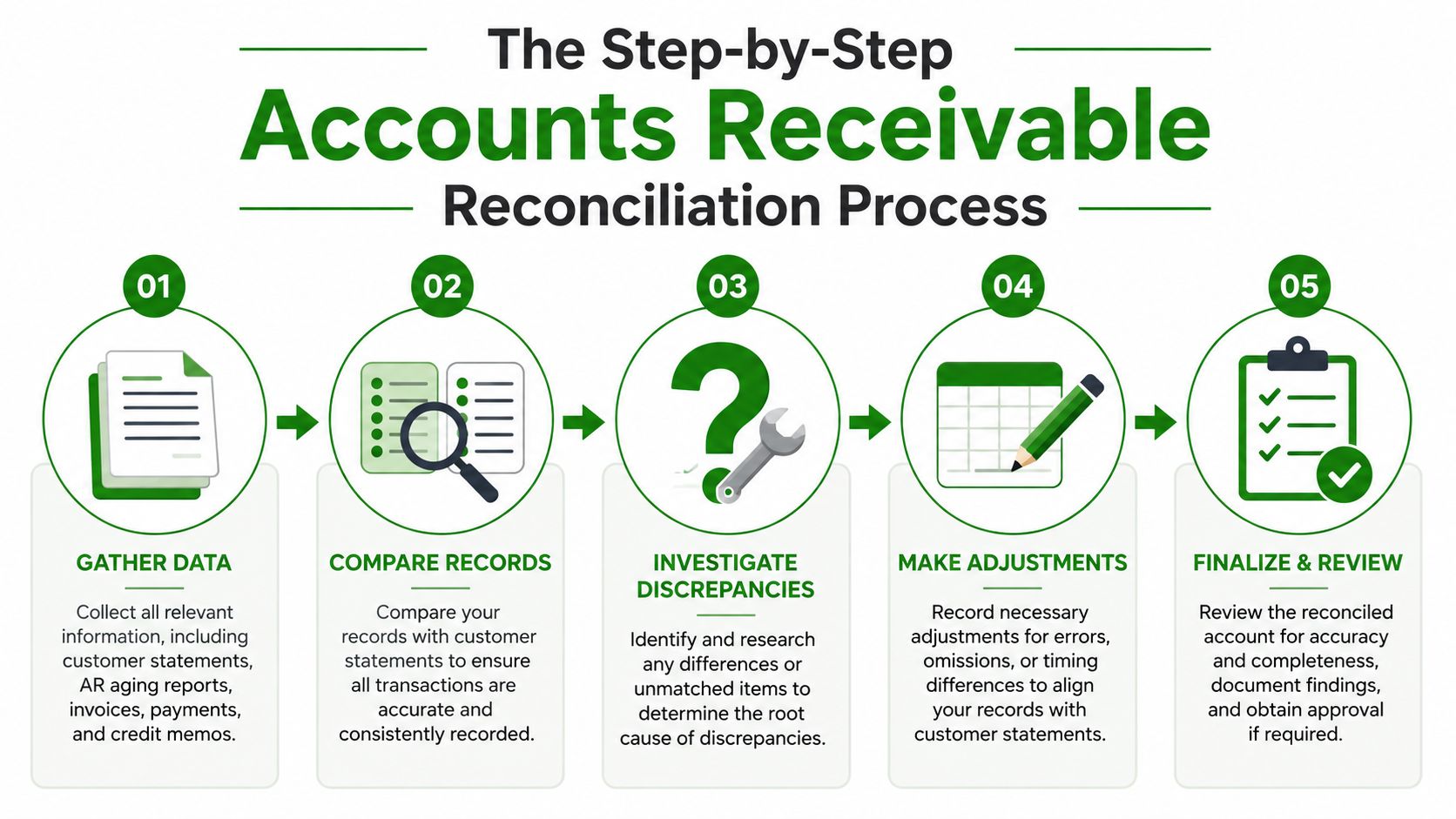
The cleanest workflow starts with one rule, compare the AR subledger and the GL on the same date, then investigate only the differences that matter. A reliable process extracts the aged AR subledger as of the close date, pulls the AR control-account balance from the general ledger for that same date, computes variance as subledger total minus GL balance, and then flags exceptions above a materiality threshold Alguna's reconciliation workflow.
Start with the records that should match
Begin with unpaid invoices, payments, and credit memos in the AR detail. Then pull the AR balance from the GL for the identical cutoff date. If the totals don't agree, you've got a variance to explain, not a reason to start rewriting the books.
Common exception types are timing mismatches, unapplied cash, misapplied payments, and missing invoices Alguna's exception list. Those aren't random surprises, they're the usual places where fragmented payment data and manual posting create trouble.
Work through the mismatch with a decision order
Use the source that best explains the transaction first, then move outward. If the invoice exists and the payment is in transit, the timing usually explains it. If cash landed but didn't hit an invoice, that's unapplied cash. If the payment hit the wrong customer, it's misapplied and should be reclassified. If the invoice never made it into the subledger, the missing invoice is the problem.
Decision rule: prioritize the document that proves the economic event, then reconcile the ledger entry to it.
AI invoice processing solutions can help by reducing the time spent hunting across invoices and remittance data, especially when volume is high. Automation doesn't remove judgment, but it does make it easier to spot the transactions that need human review.
Fix the variance and document the trail
Once you know what caused the mismatch, post the correcting journal entry and attach support. If a payment was applied to the wrong account, move it. If a credit memo was entered incorrectly, reclassify it. If the difference is just a cutoff issue, note it clearly and let the next period clear naturally.
For adjustment examples, the adjusting entries reference is a useful companion. The key is not to leave a silent variance sitting in the reconciliation file.
Reconciling Accounts Receivable in QuickBooks Online and Xero

QuickBooks Online and Xero both support AR work well enough for a small business, but they push you toward different habits. In QuickBooks Online, the Banking feeds and Reconcile tools are useful when deposits, payouts, and invoice payments need to be matched against unmatched transaction queues. In Xero, the payment matching screen and bank reconciliation flow make it easier to clear deposits once the payment is recognized in the system Xero AR guide.
QuickBooks often feels more flexible when your books are messy, but that flexibility can also hide loose handling of unmatched items. Xero tends to encourage cleaner bank reconciliation discipline, which helps when payment data arrives in a more orderly stream. Neither system solves fragmented processor data on its own, so the work is deciding which record is the source of truth when the invoice, payout, and bank deposit don't agree.
A practical way to use either platform is to reconcile the invoice first, then the payment application, then the bank deposit. That order keeps you from forcing a bank transaction to explain something the subledger already knows. It also reduces the risk of clearing an item too early just because the processor payout landed before the remittance details did.
Here's a useful way to think about the platforms:
QuickBooks Online: strong for owners who want broad visibility into banking activity and a familiar reconciliation workflow.
Xero: strong for teams that want tidy bank matching and clearer payment application behavior.
Both: still require a human review of exceptions when Stripe, ACH, card processors, or bank feeds land on different days.
Later, when you're trying to decide whether an item is timing, cash application, or a true posting error, the platform matters less than the cutoff discipline. The system won't resolve a bad source match for you, it will only organize the evidence.
Book Tech LLC is one option for small businesses that want AR tracking and reconciliation handled inside ongoing bookkeeping support, especially if the rest of the close lives in QuickBooks Online or Xero. The right setup is the one that keeps the control account, the bank activity, and the invoice detail aligned without forcing you to chase every transaction manually.
Building Your Accounts Receivable Reconciliation Checklist and Cadence
A good checklist only matters if it gets used the same way every cycle. For a small business, the working habit should be simple enough that a bookkeeper or owner can repeat it without rethinking the sequence each month. That's what turns reconciliation from a rescue mission into a control.
A practical checklist you can reuse
Pull the AR aging report: Use the same cutoff date you'll use for the GL.
Pull the AR control account: Confirm the ledger balance for that same date.
Compare totals: Identify the variance before looking at individual customers.
Scan exceptions: Review timing issues, unapplied cash, misapplied payments, and missing invoices.
Post support-backed entries: Record corrections only after the cause is documented.
Save the workpaper: Keep the reports, notes, and approvals together for auditability.
For ongoing discipline, the cadence should match how quickly your business changes. Monthly is a minimum for many smaller firms, but higher-volume businesses often need more frequent review. That's especially true when collections, forecasting, or lender reporting depends on current AR data Stripe's reconciliation guidance.
What to watch after the tie-out
You don't need a giant KPI dashboard to get value from AR reconciliation. Start with the age of unresolved items, the concentration of balances in older aging buckets, and how often the same exception keeps reappearing. If the same customer names keep showing up in the workpapers, the process problem is bigger than the one transaction in front of you.
If reconciliation keeps finding the same issue, the process upstream needs attention, not just another journal entry.
For a simple cleanup workflow, the QuickBooks cleanup checklist can help you organize the books before you settle into a regular cadence. The goal is consistency. A clean monthly close is better than an occasional heroic effort.
Troubleshooting Common Accounts Receivable Reconciliation Errors
Most reconciliation errors are not dramatic. They're small breaks in timing, posting, or matching that become obvious only when the AR detail and the GL refuse to tie. The hard part is resisting the urge to force the numbers together before you know why they're apart.
The first thing to check is whether the mismatch is caused by timing. An invoice may be issued before the cash clears, or a payment may be recorded in the subledger before the processor payout reaches the bank feed. Those are annoying, but they're usually explainable and should be documented rather than overcorrected.
The next problem is unapplied or misapplied cash. A customer pays without an invoice number, a partial payment is split across two balances, or a lump-sum receipt lands on the wrong account. In those cases, the money exists, but it's sitting in the wrong place inside the system.
When modern payment stacks are the real problem
Fragmented data is the part most generic guides gloss over. A card processor may show settlement one day, ACH may clear later, Stripe-like gateways may batch activity differently, and the bank feed may land with a net deposit after fees. If your invoice, processor payout, and bank deposit all disagree, the source of truth should be the record that proves the customer obligation and payment application first, then the payout and bank activity after that Trintech's discussion of fragmented payment data.
That decision order matters when fees are netted automatically or when a chargeback arrives after the original receipt. Don't try to make the bank feed carry more meaning than it has. Use the invoice and remittance detail to establish what was paid, then let the processor and bank data explain how it settled.
Common fixes that actually work
Trace the invoice first: Confirm the original bill and any credit memo tied to it.
Match the payment path: Follow processor, ACH, or bank records to see where the cash landed.
Separate partials from errors: A split payment is not the same as a posting mistake.
Document the exception: Write down why the item stayed open or why it was reclassified.
Avoid blanket journal entries: One large adjustment usually hides more than it solves.
The win here is not speed, it's confidence. If the bookkeeping file can explain the mismatch clearly, the balance sheet gets cleaner and the next close gets faster.
Taking Your Accounts Receivable Management to the Next Level
AR reconciliation gets more useful when it stops acting like a monthly cleanup task and starts functioning as a control system. The trade-off is straightforward, faster reconciliation surfaces problems sooner, but only if the team can review exceptions without getting buried in noise. That is why cadence should match volume, complexity, and how often people rely on AR data for decisions Numeric's AR cadence discussion.
A solo operator may do fine with a monthly rhythm if transaction volume stays low and invoices are simple. A growing company often needs weekly review, and sometimes daily review, when payment data moves through processors, ACH, and bank feeds that do not always line up cleanly. The goal is not a perfect schedule. It is a cadence that keeps unresolved items from aging unnoticed.
Where automation helps and where it doesn't
Automation does well with routine matching, exception flags, and keeping workpapers organized. It struggles when the source data is fragmented, because a match can look right until someone checks the invoice, processor payout, and bank deposit side by side. That is why automation should shorten review time, not replace judgment.
If you want a broader view of the function itself, the what is AR management resource fits well with reconciliation because it treats collections, application, and reporting as part of one operating flow. Reconciliation is one control inside that flow, not the whole job.
Choose a cadence that fits your stage:
Solo stage: keep a monthly reconciliation, document every exception, and avoid skipping support just to close faster.
Growth stage: review exceptions weekly, tighten automation rules, and make the close more disciplined.
Multi-system stage: set clear source-of-truth rules, assign formal review ownership, and strengthen the audit trail where payment data crosses systems.
Book Tech LLC works well for owners who want bookkeeping support that includes monthly reconciliations, AR management, and clean financial statements without building a full in-house accounting function. If your invoices, processor payouts, and bank deposits keep disagreeing, visit Book Tech LLC to see how a bookkeeping partner can help you tighten the close and keep your receivables under control.